Costbars User Guide
This is the master user guide for Costbars. It is complete for everything Costbars does on its own, and is used alongside the common guides, which cover what all three products share — the canvas and the user interface, the data model and scheduling engine, configuration and picklists, spreadsheet sync and data control, reports, risks and issues, cloud publishing and notifications. Agilebars and Timebars each have their own master guide in the same way.
The four PPM reference sections at the end of this guide — the Five-Step Process, Writing a Business Case, the Project Assessment Tool and the Portfolio Status and Balancing Report — were previously separate documents and are now part of this one.
Table of Contents
- Introduction
- What Makes Costbars Different
- ⚡ Get Started Fast with Ask AI
- Getting Started with PPM
- The Five-Step PPM Process
- Resource Management (Supply vs. Demand)
- Project Views (Tabular and Card)
- Portfolio Balancing with the Balanced Scorecard
- Advanced Features
- Troubleshooting
- References to Common Guides
- Quick Reference
- Getting Help
PPM Reference Sections
- The PPM Five-Step Process
- Writing a Business Case
- The Project Assessment Tool
- The Portfolio Status and Balancing Report
Introduction
Costbars is the Project Portfolio Management (PPM) edition of the Timebars product family, designed specifically for portfolio managers, PMO leaders, and executives who need to make strategic decisions about project selection, resource allocation, and portfolio balance.
While Timebars focuses on project execution and Agilebars on sprint planning, Costbars provides the strategic layer above individual projects—helping you answer critical questions like:
- Which projects should we approve, delay, or kill?
- How do we balance our portfolio across strategic objectives?
- Are we investing in the right initiatives?
- Do we have the resource capacity to deliver our committed projects?
- How do we ensure our portfolio aligns with organizational strategy?
What Makes Costbars Different
Costbars extends the core Timebars platform with specialized PPM capabilities:
Strategic Scoring and Prioritization
- Strategic Value (SV) Scores – Calculate 0-100 scores based on alignment with investment categories, initiatives, objectives, and strategies
- Ability to Execute (AE) Scores – Evaluate project feasibility based on risk, size, complexity, and organizational capacity
- Automated Recommendations – Data-driven guidance on which projects to approve, review, or reject
Portfolio-Level Views
- Bubble Chart Selection – Visual quadrant analysis showing SV Score vs. AE Score with bubble size representing budget/hours
- Balanced Scorecard – Portfolio balance analysis across strategic alignment, risk distribution, investment mix, and timeline spread
- Tabular and Card Views – Multiple viewing modes for analyzing project portfolios
Resource Capacity Management
- Supply vs. Demand Grids – See resource availability compared to project demand across time periods
- Resource Leveling – Optimize project schedules to align demand with available capacity
- Multiple View Modes – Switch between FTE/Hours, Monthly/Weekly, and various GroupBy options
Executive Reporting
- Portfolio Status Reports – Comprehensive portfolio health, balance, and strategic alignment reporting
- Notification and Escalation – Configurable alerts when projects exceed defined thresholds
- Project Assessment Tool – Standardized framework for evaluating project complexity and risk
⚡ Get Started Fast with Ask AI
The quickest way to build your portfolio's project data is to let Ask AI create it for you, then refine it for your PPM analysis.
You don't start from a blank page. When your Costbars canvas is empty, the app automatically places a starter top-level bar near the top:
L1 Get Started here using AI, click the L1 ID below
This is a ready-made Portfolio (L1) running from today for about six months. To begin:
- Click the bar's ID to open its status pop-up form.
- Click the ✨ sparkle icon (the Ask AI button) on that form.
- Describe a project — paste a Business Case, or type a name and description — and click Create.
From there you work down the hierarchy by clicking the ✨ icon on each bar to create Projects, Work Packages, Tasks and Milestones. Two options are especially useful for portfolio planning:
- Fill in Project Charter fields with AI (when creating a Project) — enriches the value proposition, benefits, success criteria and more, which feed your strategic scoring.
- Create a Resource Plan — adds a task with generic role placeholders for the people the project will need, giving you an early resource estimate before names are known.
You can also assign real, named people to Tasks (the Assign people option, or the Create Allocations button) so your Supply vs. Demand grids reflect actual capacity.
After AI finishes, refresh the page (F5) to see the new bars on the canvas.
📚 For full step-by-step instructions, examples and tips, see Common_06_How_To_Use_Ask_AI ("How to Use Ask AI") in the Common Help Topics.
Getting Started with PPM
Before running the Costbars PPM process, you need to establish your data foundation.
Prerequisite: Configure Your Resource Pool
Download the spreadsheet template through the Hamburger Icon menu. Populate the Resources Tab with:
- Resource IDs and names
- Roles and skills
- Resource rates
Then drag and drop onto the Canvas to build your centralized resource pool.
Prerequisite: Allocate Resources to Tasks
Assign resources from your pool to specific tasks using the Resource Allocator. The system automatically calculates hours, ensuring accurate workload distribution and capacity planning.
Prerequisite: Set Strategic Metadata
Configure strategic metadata to determine Strategic Value (SV) Scores. Set values for each project:
- Investment Category – Functional area or business unit
- Investment Initiative – Type of initiative (Innovation, Growth, Maintenance, Compliance)
- Investment Objective – Run/Grow/Transform classification
- Investment Strategy – Strategic pillar alignment
Tip: Use the Edit Metadata Icon to launch the Core Form from Tabular or Card View, or use the spreadsheet sync process.
Prerequisite: Complete Project Assessments
Fill in the Project Assessment form to capture critical project information:
| Field | Purpose |
|---|---|
| Risk vs Size and Complexity | 0-100 scale rating of project complexity |
| Executive Level Commitment | Level of senior leadership support |
| Estimation Class | SWAG / Based on History / Resource Driven |
| ROM Estimate | Rough Order of Magnitude budget range |
| Health Indicators | Issues, Schedule, Scope status (In-Flight projects) |
For detailed guidance on completing project assessments, see The Project Assessment Tool in the reference sections.
The Five-Step PPM Process
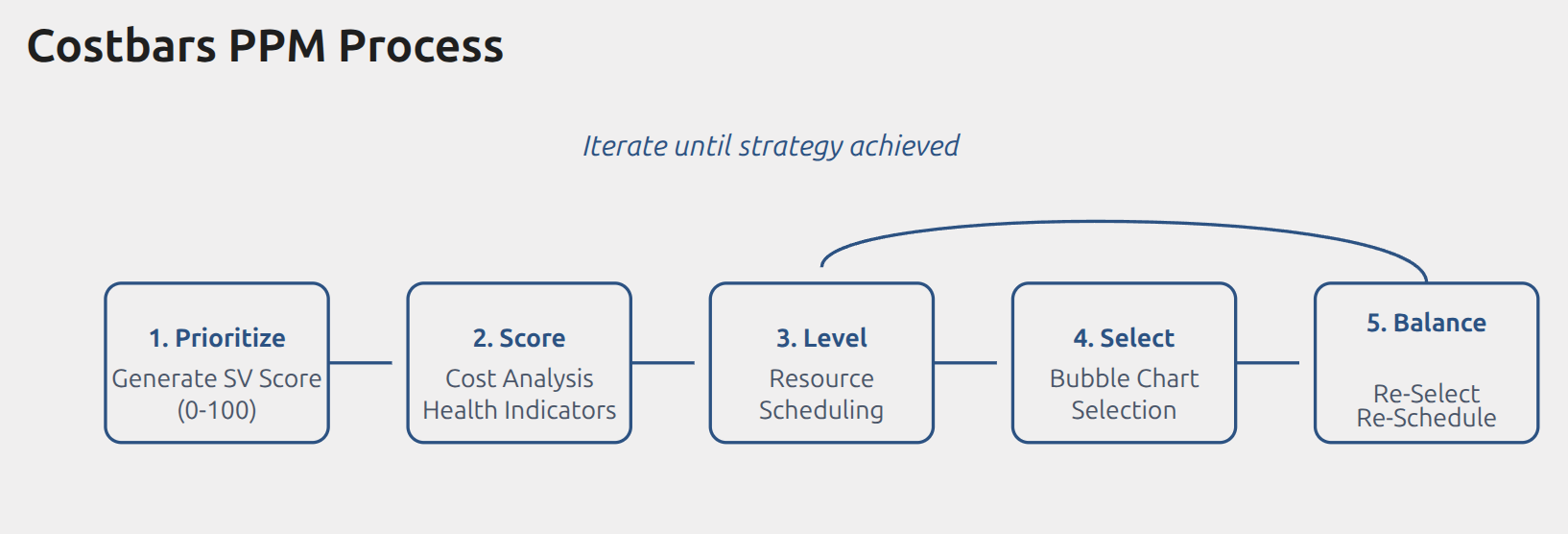
The Costbars PPM process helps you make data-driven decisions about project approval and termination through five sequential steps.
This section is the working summary. The full reference — including the data foundation you need in place first, the scoring rules and the quick reference tables — is The PPM Five-Step Process in the reference sections at the end of this guide.
STEP 1: Prioritize Projects (Generate SV Scores)
Calculate Strategic Value based on custom Alignment Values and Order of Importance. The SV Score ranges from 0-100, where 100 indicates perfect alignment with operational strategy.
How to Access:
- From the PPM Page, click Prioritize in the actions menu
- The Prioritize popup opens
Process:
Set Order of Importance by dragging items in each list (most important at top):
- Investment Categories
- Investment Initiatives
- Investment Objectives
- Investment Strategies
Click "Prioritize Test!" to preview results without saving
Click "Prioritize Finalize!" to save scores to the database
Database Field Updated: tbMDPriorityStrategic
Scoring Methods:
- Strategic + Financial (50/50): Projects with ≥4 financial fields populated
- Strategic Only (100%): Projects with insufficient financial data (no penalty applied)
STEP 2: Score Projects (Generate AE Scores)
Evaluate projects using multiple data points including health indicators, costs, hours, and Size vs Complexity metrics. The Ability to Execute (AE) Score identifies potential challenges and resource requirements.
How to Access:
- From the PPM Page, click Score in the actions menu
- The Scoring popup opens
Process:
- Review "Data Requirements & Formula Descriptions" section
- Click "Generate Ability to Execute Scores - Test" to preview
- Click "Generate Ability to Execute Scores - Final" to save
Database Fields Updated: tbMDCostbarsScore, tbMDDecisionStrategic
AE Score Recommendations:
| Score | In-Flight Projects | New Projects |
|---|---|---|
| ≥80 | Continue | PROCEED: Strong scoring |
| 60-79 | Review | REVIEW: Moderate scoring |
| <60 | Consider Terminating | REJECT: Weak scoring |
Score Color Coding:
| Color | Score Range | Meaning |
|---|---|---|
| Green | ≥80 | Strong |
| Yellow | 60-79 | Moderate |
| Red | <60 | Weak |
STEP 3: Level Resources
Optimize resource demand to align with resource supply by adjusting project start and finish dates. View in real-time the resource demand comparison across the timeline as projects are manually rescheduled on the Timebars Canvas.
How to Access:
- From the PPM Page, click Level in the actions menu
- The Leveling View opens on the Timebars Canvas
Process:
- View total resource demand chart
- Identify over-allocations (red areas)
- Drag and drop project bars to adjust schedules
- Monitor real-time demand updates
- Continue until demand aligns with supply
For detailed resource capacity analysis, see Resource Management below.
STEP 4: Select Projects (Bubble Chart)
Utilize the bubble chart visualization to quickly identify which projects to approve or kill. Bubble size, color, and position are based on SV Score and AE Score ranges.
How to Access:
- From the PPM Page, click Select or Bubble Chart in the actions menu
- The Bubble Chart view opens
Understanding the Bubble Chart:
- X-Axis: Strategic Value (SV Score)
- Y-Axis: Ability to Execute (AE Score)
- Bubble Size: Budget Cost or Forecast Hours
- Bubble Color: By Status or by Product
Quadrant Interpretation:
| Position | Meaning | Action |
|---|---|---|
| Top-Right (High SV + High AE) | Strategically aligned, likely to succeed | APPROVE – High-value, low-risk projects |
| Top-Left (Low SV + High AE) | Misaligned but low-risk projects | REVIEW – Easy to execute but questionable value |
| Bottom-Right (High SV + Low AE) | Strategically aligned, risky execution | MITIGATE – Important but needs risk reduction |
| Bottom-Left (Low SV + Low AE) | Misaligned and risky projects | KILL – Poor candidates for approval |
Selection Process:
- Enter SV Score threshold (e.g., 60)
- Enter AE Score threshold (e.g., 70)
- Click "Select Test" to preview
- Click "Select Final" to save
Database Field Updated: tbMDYesNoSelector (Yes/No)
Selection Formula:
Final Score = (SV Score × 60%) + (AE Score × 40%)
If Final Score > Average Threshold → Selected: Yes
If Final Score ≤ Average Threshold → Selected: No
STEP 5: Balance the Portfolio
Review the Score Card to assess portfolio balance. Discover anomalies and perform project adjustments to optimize portfolio alignment across strategic dimensions.
How to Access:
- From the PPM Page, click Balance or Score Card in the actions menu
- The Portfolio Score Card view opens
Score Card KPI Sections:
| Section | What It Measures |
|---|---|
| SV Score Distribution | Very High (80-100) to Very Low (0-19) |
| AE Score Distribution | Same ranges as SV Score |
| Investment Strategy | Projects by strategy alignment |
| Investment Objectives | Run/Grow/Transform balance |
| Investment Category | Category concentration |
| Risk Balance | Risk coverage across priorities |
| Resource Balance | Allocation by priority level |
| Duration Balance | Short (0-4mo) / Medium (4-12mo) / Long (12+mo) |
KPI Indicators:
- 🟢 Green: Balanced
- 🟡 Yellow: Needs attention
- 🔴 Red: Action required
Balancing Actions:
- Review KPI indicators for problem areas
- Re-select killed projects if needed
- Kill additional projects to free resources
- Reschedule projects to improve timing
- Re-run scoring if metadata changes
For comprehensive portfolio balancing guidance, see Portfolio Balancing with the Balanced Scorecard below.
Resource Management (Supply vs. Demand)
Costbars provides powerful resource capacity planning through Supply and Demand grids that show resource availability compared to project demand across time periods.
Understanding the Supply vs. Demand Grid
The grid displays 5 summary rows that help you identify over-allocation and resource constraints:
- Supply (FTE) – Available resource capacity in Full-Time Equivalents
- Demand (FTE) – Required resource capacity from all projects
- Variance (S-D) – Supply minus Demand (negative = over-allocated)
- Month Header – Time period labels (Monthly or Weekly view)
- Resource/Project/Role – The dimension being analyzed
View Modes
FTE vs Hours:
- FTE (Full-Time Equivalent) – Shows capacity as decimal (e.g., 0.5 = half-time)
- Hours – Shows actual hours required/available
Monthly vs Weekly:
- Monthly – Aggregates capacity across entire months
- Weekly – Provides granular week-by-week analysis
GroupBy Options:
| GroupBy | What It Shows |
|---|---|
| Project | Resource demand organized by project |
| Resource Name | Workload for each named resource |
| Role | Capacity and demand by role/skill |
Named vs Generic Resources
Named Resources:
- Specific individuals (e.g., "John Smith, Senior Developer")
- Allocated by person
- Shows individual capacity and workload
Generic Resources:
- Role-based allocation (e.g., "Developer", "Business Analyst")
- Represents pools of similar resources
- Useful for planning before specific assignments
Interpreting Variance Values
| Variance | Meaning | Action |
|---|---|---|
| Positive (e.g., +2.5) | Supply exceeds demand | Capacity available for new projects |
| Zero or Near-Zero | Balanced allocation | Optimal utilization |
| Negative (e.g., -1.5) | Over-allocated | Delay projects, hire resources, or reduce scope |
Using Supply vs. Demand for Resource Leveling
- Identify Over-Allocations – Look for negative variance (red) in any time period
- Adjust Project Schedules – Drag project bars on the canvas to shift demand
- Monitor Real-Time Updates – Watch variance recalculate as you move projects
- Balance Across Time – Smooth resource demand to avoid peaks and valleys
Best Practice: Aim for slight under-allocation (positive variance) to allow for unexpected work and planning buffers.
Project Views (Tabular and Card)
Costbars provides two specialized views for analyzing your project portfolio: Tabular View and Card View.
Tabular View
A spreadsheet-style interface for data-intensive portfolio analysis.
How to Access:
- From the PPM Page, click Tabular View in the actions menu
- The spreadsheet-style grid opens
Key Columns:
| Column | Description |
|---|---|
| ID | Project identifier (e.g., L2:PJ01) |
| Type | Project type classification |
| Name | Project name |
| Product | Timebars/Agilebars/Costbars |
| Status | In-Flight, Approved, Proposed, etc. |
| SV Score | Strategic Value Score (0-100) |
| AE Score | Ability to Execute Score (0-100) |
| F Score | Final Combined Score |
| Selected | Yes/No indicator from selection process |
| Decision | Approve/Review/Reject recommendation |
Use Cases:
- Quickly sort and filter large project lists
- Export to Excel for further analysis
- Bulk edit project metadata
- Review scoring results across entire portfolio
Card View
A visual, card-based interface for intuitive portfolio review.
How to Access:
- From the PPM Page, click Cards View in the actions menu
- The card grid displays
Card Elements:
Each card displays:
- Project name and ID
- Product type (Costbars/Timebars/Agilebars)
- Status badge (color-coded)
- SV Score and AE Score (with color indicators)
- Budget/forecast information
- Selection status (Yes/No)
- Decision recommendation
Use Cases:
- Executive presentations and portfolio reviews
- Visual pattern recognition (e.g., many red scores)
- Quick scanning of portfolio health
- Stakeholder communication
Editing Metadata from Views
From Tabular View:
- Click the Edit Metadata Icon on any row
- Core Form launches with full project details
- Make changes and save
From Card View:
- Click any card to expand
- Access editing options
- Update fields and save
Portfolio Balancing with the Balanced Scorecard
The Balanced Scorecard helps you assess whether your portfolio is balanced across multiple strategic dimensions.
What is Portfolio Balance?
A balanced portfolio means:
- Investment is distributed appropriately across strategic objectives
- Risk is managed within organizational tolerance
- Resources are allocated to the right priorities
- Projects span appropriate time horizons
An unbalanced portfolio creates strategic risk, operational problems, and misalignment with organizational goals.
The Four Scorecard Quadrants
1. Strategic Alignment
Shows how portfolio budget is distributed across strategic pillars (e.g., "Increase market share", "Improve core products", "Ensure compliance").
What to Look For:
- Does budget allocation match strategic priorities?
- Are top strategic pillars adequately funded?
- Are low-priority areas consuming too many resources?
Example Problem:
- Strategic Pillar #1 receives only 15% of budget
- Strategic Pillar #5 receives 45% of budget
- Action: Reallocate budget to match stated priorities
2. Risk Balance
Displays portfolio distribution across risk categories (Very High, High, Medium, Low, Very Low).
What to Look For:
- Does risk distribution match organizational risk tolerance?
- Are you over-concentrated in high-risk projects?
- Do you have enough low-risk quick wins?
Example Problem:
- 60% of budget allocated to High/Very High risk projects
- Organization has conservative risk appetite
- Action: Kill or defer high-risk projects; approve safer alternatives
3. Investment Mix
Shows portfolio breakdown by initiative type:
| Initiative Type | Typical Range |
|---|---|
| Maintenance & Operational | 20-35% |
| Innovation & Transformation | 20-40% |
| Growth & Enhancement | 25-35% |
| Mandatory & Compliance | 10-20% |
What to Look For:
- Over-investment in Maintenance (starving innovation)
- Under-investment in Compliance (regulatory risk)
- Appropriate balance for your organizational strategy
Example Problem:
- 50% of budget in Maintenance & Operational
- Only 15% in Innovation & Transformation
- Action: Defer low-value maintenance; approve innovation projects
4. Timeline Distribution
Evaluates balance across time horizons:
| Time Horizon | Typical Range | Examples |
|---|---|---|
| Short-term (0-4 months) | 20-30% | Quick wins, bug fixes |
| Medium-term (4-12 months) | 40-50% | Standard projects |
| Long-term (12+ months) | 20-30% | Strategic transformations |
What to Look For:
- Zero long-term projects (no strategic positioning)
- Too many short-term projects (reactive mode)
- Balanced distribution across horizons
Example Problem:
- 0% long-term projects
- 80% medium-term projects
- Action: Approve strategic long-term initiatives
How to Use the Balanced Scorecard
Step 1: Review Each Quadrant
- Check KPI indicators (🟢 Green, 🟡 Yellow, 🔴 Red)
- Identify problem areas (red or yellow)
Step 2: Analyze Imbalances
- Understand why imbalances exist
- Consider organizational context
- Determine acceptable vs. problematic imbalances
Step 3: Take Rebalancing Actions
- Kill Projects: Remove low-priority projects in over-represented categories
- Approve Projects: Fast-track projects in under-represented categories
- Reschedule Projects: Shift timelines to smooth resource demand
- Adjust Metadata: Correct misclassified projects
Step 4: Re-Run the Five-Step Process
- Re-prioritize if strategic rankings changed
- Re-score if project complexity changed
- Re-select with new thresholds
- Review updated Balanced Scorecard
Step 5: Monitor Over Time
- Generate scorecard monthly
- Track progress toward target balance
- Adjust approval criteria to maintain balance
Advanced Features
The following advanced features provide additional depth for sophisticated portfolio management. Click the links below for detailed guides.
Project Assessment Tool
A comprehensive evaluation framework that helps you objectively evaluate project feasibility, complexity, and risk before committing resources.
What It Does:
- Analyzes projects across four dimensions: Technical Risk, Political Risk, Size, and Complexity
- Generates an Overall Feasibility Score (0-100)
- Provides tailored recommendations based on risk category
- Helps compare projects objectively using consistent criteria
When to Use:
- Before approving new projects
- During portfolio reviews
- When requesting additional resources
- To justify timeline or budget negotiations
Key Sections:
- Technology Assessment (maturity, team expertise, architecture complexity, integrations)
- Team & Resources Assessment (team size, stakeholder count, resource availability)
- Organizational & Political Factors (change impact, executive Comittment, stakeholder alignment)
- External Factors & Constraints (regulatory requirements, external dependencies, market timing)
- Project Scope & Scale (duration, budget magnitude)
Risk Categories:
| Score | Risk Level | Recommended Action |
|---|---|---|
| 0-25 | LOW RISK (Green) | Proceed with standard project management |
| 26-50 | MEDIUM RISK (Yellow) | Enhanced monitoring and risk mitigation |
| 51-75 | HIGH RISK (Orange) | Consider phasing or scope reduction |
| 76-100 | CRITICAL RISK (Red) | Reconsider or start with proof-of-concept |
For complete assessment guidance: See The Project Assessment Tool in the reference sections at the end of this guide.
Portfolio Status and Balancing Report
A comprehensive portfolio-wide report providing health indicators, financial analysis, strategic alignment assessment, and multi-dimensional balance evaluation.
What It Provides:
- Executive Summary with health indicators (Overall, Scope, Schedule, Cost, Hours, Risk, Issues)
- Financial Summary by category (In Progress, Approved, Proposals)
- Strategic Alignment Analysis (budget distribution across strategic pillars)
- In-Flight Projects Status (with critical projects requiring attention)
- Approved Projects Readiness Assessment
- New Proposals Evaluation
- Risk Score Portfolio Analysis (budget distribution by risk level)
- Initiative Type Balance Analysis (Maintenance, Innovation, Growth, Compliance)
- Time Horizon Balance Analysis (Short/Medium/Long-term mix)
When to Use:
- Before quarterly portfolio review meetings
- When evaluating new project proposals
- When needing to free up resources
- For executive leadership reporting
- To assess strategic alignment
Key Metrics:
| Metric | Purpose |
|---|---|
| Portfolio Health Indicators | Quick overview of portfolio status |
| Budget Variance Analysis | Spending vs. planned budgets |
| Strategic Pillar Allocation % | Does spending match strategic priorities? |
| Risk Distribution % | Is portfolio within risk tolerance? |
| Initiative Type Balance Score | Balanced across project types? |
| Time Horizon Balance Score | Appropriate short/medium/long-term mix? |
For complete report guide: See Costbars PPM Pf Detail Report for Balancing How To
Configuring Notification Thresholds and Alerts
Configure automated notifications to alert stakeholders when projects exceed defined thresholds for schedule, budget, risk, or health indicators.
What It Does:
- Define threshold rules for triggering notifications
- Set delivery preferences (SMS, Push, Email)
- Configure escalation paths for critical projects
- Customize quiet hours and cooldown periods
Threshold Rules:
| Rule | What It Monitors | Example |
|---|---|---|
| Days Overdue Threshold | Schedule slippage | Alert if >5 days late |
| Budget Overrun % | Cost variance | Notify if costs exceed budget by 15% |
| Overall Health | Project health status | Flag any project marked Red |
| Executive Commitment | Sponsor support level | Alert if Comittment drops |
| Strategic Value % | Strategic alignment | Flag high-value at-risk projects |
| Likelihood of Success % | Risk scoring | Alert if likelihood <40% |
Configuration Steps:
- Open Admin → Notifications
- Add or Edit Notification Profile
- Set contact details and delivery channels
- Configure threshold values
- Test configuration before activating
- Enable automated alerts
For complete configuration guide: Text Notifications Guide
Text Notifications User Guide, Part 2 — Technical Reference
Five-Step Scoring Process (Technical Details)
Deep dive into the scoring methodology, data requirements, and formula specifications for both Strategic Value (SV) and Ability to Execute (AE) scoring.
SV Score Components:
- Investment Category alignment
- Investment Initiative alignment
- Investment Objective alignment
- Investment Strategy alignment
- Financial metrics (if sufficient data available)
AE Score Components:
- Risk vs. Size and Complexity assessment
- Executive Commitment level
- Estimation Class quality
- Health Indicators (for In-Flight projects)
- Budget and hours variance (for In-Flight projects)
Data Requirements:
- Minimum required fields for scoring
- Data quality thresholds
- Handling of missing data
- "Not Assessed" handling
For complete technical specifications: See Costbars PPM Scoring Guide 5 Step Process
Troubleshooting
Missing Data Warnings
Problem: Scoring fails with data requirement errors
Solutions:
- Check that Project Assessment fields are populated
- Verify Risk vs Size/Complexity is assessed (not "Not Assessed")
- Ensure Executive Commitment is set
- For In-Flight: Check health indicators and baseline hours
- For New: Check Estimation Class and ROM Estimate
Projects Not Appearing in Views
Problem: Expected projects don't show in Tabular/Card/Bubble Chart
Solutions:
- Confirm Status is not "Closed"
- Check State is not "Spawned"
- Verify project is within selected filter criteria
- Refresh the view
Financial Score Shows Zero
Problem: SV Score shows 0 or projects not getting financial component
Solution:
- Need at least 4 of 7 financial fields populated
- Values of "Not Assessed" don't count toward the 4-field minimum
- Enter actual budget, baseline, forecast, or cost values
Resource Variance Always Negative
Problem: Supply vs. Demand grid shows constant over-allocation
Solutions:
- Verify resource supply is configured correctly
- Check that resource pool includes all available resources
- Consider whether project resource estimates are realistic
- Use resource leveling to shift project timelines
References to Common Guides
Costbars shares many features with Timebars and Agilebars. For guidance on these common capabilities, refer to these user guides:
Core Functionality
- Common User Interface Guide – Canvas navigation, filters, hierarchy display, bar creator, editing bars, baseline management, view controls
- Data Synchronization, Backup, Recovery and Retention Guide – How data is organized, IndexedDB details, data hierarchy, backup/restore procedures
- Data Synchronization, Backup, Recovery and Retention Guide – 6-step sync cycle, CSV file export/import, template configuration, bidirectional data exchange
Project Management Features
- Common Risks Issues Change Requests User Guide – Creating and managing RIC items, visual indicators, card/tabular views, progress workflows
Reporting and Publishing
- Forms, Reports and Graphs Guide – General Reports, Portfolio Reports, Project Reports, Task Reports, Resource Reports
- Common Cloud Reports and Dashboard Guide – Executive Portfolio Reports, Card-Based Drilldown, Interactive dashboards with 7-dimension health tracking
- Common Cloud Publishing Guide – Publishing to Timebars Cloud, PubSets, Re-Publish, Re-Hydrate, cross-device sync
Quick Reference
PPM Menu Actions
| Button | Action |
|---|---|
| Prioritize | Generate SV Scores based on strategic alignment |
| Score | Generate AE Scores based on feasibility assessment |
| Level | Open resource leveling view for capacity optimization |
| Select / Bubble Chart | Run selection algorithm with visual quadrant analysis |
| Balance / Score Card | Review portfolio balance across multiple dimensions |
| Tabular View | Spreadsheet-style data view for analysis |
| Cards View | Visual card-based view for reviews |
| Process Help ❓ | Open PPM documentation |
Score Interpretation
| Score Range | Color | SV Score Meaning | AE Score Meaning |
|---|---|---|---|
| 80-100 | Green | Very High Strategic Value | Very High Ability to Execute |
| 60-79 | Yellow | High Strategic Value | High Ability to Execute |
| 40-59 | Orange | Moderate Strategic Value | Moderate Ability to Execute |
| 0-39 | Red | Low Strategic Value | Low Ability to Execute |
Decision Matrix
| SV Score | AE Score | Recommendation |
|---|---|---|
| High | High | APPROVE – Strategic and feasible |
| High | Low | MITIGATE – Important but risky; reduce scope or phase |
| Low | High | REVIEW – Easy to execute but questionable value |
| Low | Low | KILL – Neither strategic nor feasible |
Getting Help
For additional assistance:
- Process Help Button (❓) – Context-sensitive help within the PPM interface
- Advanced Feature Guides – See links in Advanced Features section above
- Common Feature Guides – See links in References to Common Guides section above
- Support Contact – Contact your Timebars administrator or support team
PPM Reference Sections
The four sections that follow are the detailed references behind the PPM workflow described above. Each was previously a separate document. They run in the order an initiative travels through the portfolio:
| Section | Covers |
|---|---|
| The PPM Five-Step Process | the method, end to end, and the data foundation it depends on |
| Writing a Business Case | how an idea enters the portfolio, with two worked examples |
| The Project Assessment Tool | scoring one project's risk, size and complexity |
| The Portfolio Status and Balancing Report | reading the portfolio as a whole, and acting on it |
Read them in order the first time; after that, go straight to the one you need.
The PPM Five-Step Process
Introduction
This guide covers the Costbars Project Portfolio Management (PPM) module - a Five-Step Procedure for Project Approval or Termination.
What you will learn:
- Prerequisite Workflow Process - Prepare project metadata for project selection
- Project Selection Process - How to use Costbars Project Pipeline Scheduler and prioritise, approve or kill projects
Costbars High-Level Process Diagram
The PPM (Project Portfolio Management) process can start once the Portfolio of Projects has been resource-loaded and is ready for analysis. If resource-loaded schedules are not feasible—which is often the case—ensure that Hours Estimates and/or Cost Estimates have been entered into each Project Bar within the Portfolio.
Prerequisite Workflow: Establish the Data Foundation
Before running the Project Selection Process, complete these five setup steps.
Prerequisite Step 1: Configure Resource Pool & Metadata
Download the spreadsheet template through the Hamburger Icon menu. Populate the Resources Tab with resource IDs, names, roles, skills, and rates. Then drag and drop onto the Canvas to build your centralized resource pool.
Prerequisite Step 2: Establish Resource Summary Task
Create a resource summary task that serves as the foundation for resource allocation. This task provides a consolidated view and enables accurate resource planning across the project portfolio.
Prerequisite Step 3: Allocate Resources to Tasks
Assign resources from your centralized pool to specific tasks using the Resource Allocator. The system automatically calculates hours, ensuring accurate workload distribution and capacity planning.
Prerequisite Step 4: Set Strategic Metadata
Configure strategic metadata against projects to determine Strategic Value (SV) Scores. This metadata drives portfolio balance decisions and ensures alignment with organizational priorities.
Set values for each project:
- Investment Category
- Investment Initiative
- Investment Objective
- Investment Strategy
Tip: Use the Edit Metadata Icon to launch the Core Form from Tabular or Card View, or use the spreadsheet sync process.
Prerequisite Step 5: Complete Project Assessment
Fill in the Project Assessment form to finalize the Project Charter. This comprehensive assessment captures all critical project information, justification, and expected outcomes.
Project Assessment Form Fields:
The Project Assessment captures data that feeds into the AE Score calculation:
| Field | Purpose |
|---|---|
| Risk vs Size and Complexity | 0-100 scale rating of project complexity |
| Executive Level Commitment | Level of senior leadership support |
| Estimation Class | SWAG / Based on History / Resource Driven |
| ROM Estimate | Rough Order of Magnitude budget range |
| Health Indicators | Issues, Schedule, Scope status (In-Flight projects) |
For In-Flight Projects, also assess:
- Health Issues status (Green/Yellow/Red)
- Health Schedule status (Green/Yellow/Red)
- Health Scope status (Green/Yellow/Red)
- Budget Cost
- Baseline Hours
For New Projects, also assess:
- Cost estimate
- Work hours estimate
- State (Approved/Awaiting Approval/etc.)
Project Selection Process: 5 Steps to Approve or Terminate Projects
STEP 1: Prioritize Projects (SV Score)
Calculate Strategic Value based on custom Alignment Values and Order of Importance. The SV Score ranges from 0-100, where 100 indicates perfect alignment with operational strategy. This score becomes the foundation for all prioritization decisions.
How to Access:
- From the PPM Page, click Prioritize in the actions menu
- The Prioritize popup opens
Process:
Set Order of Importance by dragging items in each list (most important at top):
- Investment Categories
- Investment Initiatives
- Investment Objectives
- Investment Strategies
Click "Prioritize Test!" to preview results without saving
Click "Prioritize Finalize!" to save scores to the database
Database Field Updated: tbMDPriorityStrategic
Scoring Methods:
- Strategic + Financial (50/50): Projects with ≥4 financial fields populated
- Strategic Only (100%): Projects with insufficient financial data (no penalty applied)
STEP 2: Score Projects (Risk/Complexity)
Evaluate projects using multiple data points including health indicators, costs, hours, and Size vs Complexity metrics. Incorporate additional project metadata to generate comprehensive risk scores that identify potential challenges and resource requirements.
How to Access:
- From the PPM Page, click Score in the actions menu
- The Scoring popup opens
Process:
- Review "Data Requirements & Formula Descriptions" section
- Click "Generate Ability to Execute Scores - Test" to preview
- Click "Generate Ability to Execute Scores - Final" to save
Database Fields Updated: tbMDCostbarsScore, tbMDDecisionStrategic
AE Score Recommendations:
| Score | In-Flight Projects | New Projects |
|---|---|---|
| ≥80 | Continue | PROCEED: Strong scoring |
| 60-79 | Review | REVIEW: Moderate scoring |
| <60 | Consider Terminating | REJECT: Weak scoring |
STEP 3: Level Resources
Optimize resource demand to align with resource supply by adjusting project start and finish dates. View in real-time the resource demand comparison across the timeline as projects are manually rescheduled on the Timebars Canvas.
How to Access:
- From the PPM Page, click Level in the actions menu
- The Leveling View opens on the Timebars Canvas
Process:
- View total resource demand chart
- Identify over-allocations (red areas)
- Drag and drop project bars to adjust schedules
- Monitor real-time demand updates
- Continue until demand aligns with supply
STEP 4: Select Projects
Utilize the bubble chart visualization to quickly identify which projects to kill. Bubble size, color, and position are based on SV Score and Risk Score ranges. Enter your thresholds and run the selection algorithm for data-driven recommendations.
How to Access:
- From the PPM Page, click Select or Bubble Chart in the actions menu
- The Bubble Chart view opens
Understanding the Bubble Chart:
- X-Axis: Strategic Value (SV Score)
- Y-Axis: Ability to Execute (AE Score)
- Bubble Size: Budget Cost or Forecast Hours
- Bubble Color: By Status or by Product
Quadrant Interpretation:
| Position | Meaning |
|---|---|
| Top-Right (High SV + High AE) | Strategically aligned, more likely to succeed |
| Top-Left (Low SV + High AE) | Misaligned low risk projects |
| Bottom-Right (High SV + Low AE) | Strategically aligned, less likely to succeed |
| Bottom-Left (Low SV + Low AE) | Misaligned and risky projects |
Selection Process:
- Enter SV Score threshold
- Enter AE Score threshold
- Click "Select Test" to preview
- Click "Select Final" to save
Database Field Updated: tbMDYesNoSelector (Yes/No)
Selection Formula:
Final Score = (SV Score × 60%) + (AE Score × 40%)
If Final Score > Average Threshold → Selected: Yes
If Final Score ≤ Average Threshold → Selected: No
STEP 5: Balance the Portfolio
Review the Score Card—is it in balance? Discover anomalies and perform project adjustments as necessary to optimize portfolio balance. Re-select killed projects, kill other projects, or reschedule projects to achieve optimal alignment.
How to Access:
- From the PPM Page, click Balance or Score Card in the actions menu
- The Portfolio Score Card view opens
Score Card KPI Sections:
| Section | What It Measures |
|---|---|
| SV Score Distribution | Very High (80-100) to Very Low (0-19) |
| AE Score Distribution | Same ranges as SV Score |
| Investment Strategy | Projects by strategy alignment |
| Investment Objectives | Run/Grow/Transform balance |
| Investment Category | Category concentration |
| Risk Balance | Risk coverage across priorities |
| Resource Balance | Allocation by priority level |
| Duration Balance | Short (0-4mo) / Medium (4-12mo) / Long (12+mo) |
KPI Indicators:
- 🟢 Green: Balanced
- 🟡 Yellow: Needs attention
- 🔴 Red: Action required
Balancing Actions:
- Review KPI indicators for problem areas
- Re-select killed projects if needed
- Kill additional projects to free resources
- Reschedule projects to improve timing
- Re-run scoring if metadata changes
Quick Reference
Menu Actions
| Button | Action |
|---|---|
| Prioritize | Generate SV Scores |
| Score | Generate AE Scores |
| Level | Open resource leveling view |
| Select/Bubble Chart | Run selection algorithm |
| Balance/Score Card | Review portfolio balance |
| Tabular View | Spreadsheet-style data view |
| Cards View | Visual card-based view |
| Process Help ❓ | Open PPM documentation |
Score Color Coding
| Color | Score Range | Meaning |
|---|---|---|
| Green | ≥80 | Strong |
| Yellow | 60-79 | Moderate |
| Red | <60 | Weak |
Troubleshooting
Missing Data Warnings:
- Check that Project Assessment fields are populated
- Verify Risk vs Size/Complexity is assessed (not "Not Assessed")
- Ensure Executive Commitment is set
- For In-Flight: Check health indicators and baseline hours
- For New: Check Estimation Class and ROM Estimate
Projects Not Appearing:
- Confirm Status is not "Closed"
- Check State is not "Spawned"
Financial Score Shows Zero:
- Need at least 4 of 7 financial fields populated
- Values of "Not Assessed" don't count toward the 4-field minimum
Transform Your Portfolio Management: Data-driven decisions. Strategic alignment. Optimized outcomes.
For technical details on scoring algorithms, see the Costbars PPM Technical Design Specification.
Writing a Business Case
How the Business Case becomes a Project Charter
In Costbars an idea enters as an initiative justified by a Business Case, is scored/selected, and is then authorized by a Project Charter to become a formal project. You author the Business Case first — with an AI assistant or by hand, following the sample below — then bring it into Costbars:
- On a Portfolio (L1) bar, click its ID, then the ✨ Ask AI icon.
- Paste your Business Case (formal or rough — headings are optional) and click Create.
- The AI creates one Project (L2) initiative and maps your content into the Project Charter fields by meaning. Anything it cannot place in a specific field is preserved under headings in Management Notes (
tbMDNotes) so nothing is lost. - Review and complete any thin fields. The initiative starts at Status = New.
- Run the existing PPM scoring / selection. Once the initiative is approved and formally underway, set Status = In Progress.
You can also enter or refine Charter data by hand: click a Project (Green) bar's ID → Form, scroll to the Project Charter section, and edit the fields (you can paste formatted text directly; data saves when you leave a field). To hide fields from your users, configure the Core Report spreadsheet tab. To view and print the Project Charter, launch the Cards view on the PPM Page or the Portfolio Reports Menu.
The Business Case is your input document; the Project Charter is the formal, generated sign-off artifact. The sample Business Case below is a worked example you can adapt for AI-assisted or manual authoring — it is a sample, not a fixed template.
Sample Business Case: CRM System Cloud Migration
The following example was generated by Grok.
Metadata
| Attribute | Value | Attribute | Value | Attribute | Value |
|---|---|---|---|---|---|
| Status | New | Sponsor | Jim Cox | Primary Line of Business | IT Department |
| Workflow State | Awaiting Approval | PMI Phase | Initiating | Business Owner | Jim Cox |
| Stage | Prioritized | Business Advisor | Joe Blow | Sponsoring Department | Sales |
| Investment Portfolio | xxx | Type of Initiative | Project | Primary Contact | null |
| Contact Info | xxx |
Project Name/Title
CloudSync CRM Migration
Background Information
The organization currently relies on an on-premises CRM system (LegacyCRM v5.2) that is over a decade old. The system struggles with frequent downtime, slow performance, and limited scalability, impacting sales team productivity. Maintenance costs have risen by 15% annually, totaling $120,000 in 2024. A cloud-based CRM solution offers scalability, enhanced security, and integration with modern tools like mobile apps and AI analytics.
Stakeholders
| Name | Role | Department | Contact Info |
|---|---|---|---|
| Jim Cox | Sponsor/Business Owner | Sales | [email protected] |
| Joe Blow | Business Advisor | IT | [email protected] |
| Sarah Lee | IT Project Manager | IT | [email protected] |
| Sales Team | End Users | Sales | [email protected] |
| Finance Department | Budget Approver | Finance | [email protected] |
Problem/Opportunity
The current on-premises CRM system cannot support the organization’s growth, with a 20% increase in customer data annually. It lacks real-time analytics, mobile access, and integration with marketing platforms, leading to missed sales opportunities estimated at $200,000 annually. Migrating to a cloud-based CRM (e.g., Salesforce or HubSpot) provides scalability, real-time insights, and improved user experience.
Consequence of Inaction
- Financial Impact: Continued maintenance costs of $120,000/year and lost revenue of $200,000/year due to inefficiencies.
- Operational Impact: Increased system downtime (currently 10 hours/month) disrupts sales workflows.
- Competitive Risk: Competitors using modern CRMs gain market share through faster customer response times.
Objectives and Scope
Objectives
- Migrate the CRM system to a cloud platform by Q4 2025.
- Reduce system downtime to under 1 hour/month.
- Enable mobile access and real-time analytics for the sales team.
- Achieve 20% improvement in sales team productivity within 6 months post-migration.
Scope
- Inclusions: Data migration, cloud CRM setup, user training, and integration with email and marketing tools.
- Exclusions: Hardware upgrades for on-premises servers, custom feature development beyond standard CRM capabilities.
Expected Benefits
- Financial: $150,000/year savings from reduced maintenance and $250,000/year in additional revenue from improved sales efficiency.
- Operational: 90% reduction in downtime and 20% faster data access.
- Strategic: Enhanced customer insights through AI analytics, supporting 25% faster decision-making.
Capabilities Needed
- Cloud infrastructure (e.g., AWS or Azure).
- CRM platform expertise (e.g., Salesforce-certified administrators).
- Data migration tools (e.g., Informatica or Talend).
- Training program for 50+ sales staff on cloud CRM usage.
Senior Level Commitment
- Sponsor: Jim Cox (VP of Sales) will champion the project, securing budget and aligning with strategic goals.
- IT Director: Maria Gomez will oversee technical implementation and resource allocation.
Constraints & Assumptions
Constraints
- Budget capped at $300,000 for migration and first-year licensing.
- Project completion required by Q4 2025 to align with sales cycle.
Assumptions
- Existing data can be migrated without significant cleansing (80% clean).
- Staff training will be completed within 2 months post-migration.
Cost Benefit Analysis
| Item | Cost | Benefit | Value |
|---|---|---|---|
| Cloud CRM Licensing (Year 1) | $100,000 | Maintenance Cost Savings | $150,000/year |
| Data Migration & Setup | $150,000 | Increased Revenue | $250,000/year |
| Training Program | $50,000 | Productivity Gains | $100,000/year |
| Total | $300,000 | Total (Year 1) | $500,000 |
ROI: 66.7% in Year 1 ($500,000 benefits - $300,000 costs / $300,000).
Risk Assessment
| Risk | Likelihood | Impact | Mitigation |
|---|---|---|---|
| Data migration errors | Medium | High | Conduct pre-migration testing and backups. |
| Staff resistance to new system | High | Medium | Implement change management and training. |
| Budget overrun | Low | High | Lock in vendor contracts early. |
Timeline and Milestones
| Milestone | Date |
|---|---|
| Vendor Selection | Q2 2025 |
| Data Migration Completion | Q3 2025 |
| System Testing | Q3 2025 |
| User Training | Q4 2025 |
| Go-Live | Q4 2025 |
Resource Requirements
- Personnel: 1 Project Manager, 2 CRM Developers, 1 Data Analyst, 1 Trainer (6-month contracts).
- Tools: Cloud CRM subscription, migration software, training materials.
- Budget: $300,000 (including licensing, migration, and training).
- Gaps: Need to hire external CRM consultant for 3 months.
Workflow Status
- Current Status: Awaiting Approval (as of April 29, 2025).
- Next Steps: Present to Finance Committee in May 2025 for budget approval.
Written By
- Author: Sarah Lee, IT Project Manager
- Role: Project Lead
- Date: April 29, 2025
A second worked example, generated by an AI assistant
CRM Cloud Migration Business Case
Project ID: CLD-CRM-2025-Q2
Project Name: Enterprise CRM Cloud Migration
Department: Information Technology
Project Sponsor: Sarah Chen, Chief Information Officer
Project Manager: Michael Rodriguez
Date Created: April 29, 2025
Version: 1.0
Status: Draft - Pending Executive Approval
Priority: High
Estimated Budget: $675,000
Expected Duration: 8 months
Executive Summary
Global Dynamics Inc. currently relies on a legacy on-premises CRM system that is approaching end-of-life with vendor support ending in December 2025. This business case proposes migrating our CRM infrastructure to a cloud-based solution to enhance customer engagement capabilities, improve operational efficiency, and reduce long-term IT maintenance costs. The initiative aligns with our 2025 digital transformation strategy and is expected to generate an ROI of 127% over three years with a payback period of 17 months. Implementation would begin in Q3 2025 with full deployment by Q1 2026.
Background Information
Global Dynamics has been using the current on-premises SalesForce Enterprise v9.2 CRM system for over seven years, with significant customizations developed for our specific sales and customer service processes. System performance has degraded over time, and our current architecture lacks integration capabilities with modern cloud tools our teams increasingly rely on. IT maintenance costs have risen 18% annually for the past three years, while system availability has declined to 97.2% against our target of 99.5%.
Our 2025-2027 strategic plan emphasizes customer-centric digital transformation, requiring more robust analytics and omnichannel engagement capabilities that our current system cannot efficiently deliver. Recent competitive analysis reveals that 78% of our industry peers have already transitioned to cloud-based CRM infrastructure, potentially gaining market advantages through improved customer insights and engagement capabilities.
Stakeholders
- Executive Leadership Team: Requires improved business intelligence and ROI from customer relationship management
- Sales Department (120 users): Primary system users needing reliable mobile access and integrated communication tools
- Customer Service Team (85 users): Requires enhanced case management and customer journey tracking
- IT Department: Responsible for implementation, integration, and ongoing support
- Finance Department: Concerned with cost management and accurate revenue forecasting
- Marketing Team (45 users): Needs better campaign attribution and customer segmentation tools
- Compliance & Legal: Must ensure data governance and privacy regulations are maintained
- External Customers: Will experience improved service delivery and communication channels
Problem Opportunity & Options Analysis
The current on-premises CRM system presents several challenges:
- Limited mobile functionality hampering field sales effectiveness (productivity loss estimated at $325,000 annually)
- Siloed data preventing unified customer view across touchpoints
- Manual reporting processes requiring 25+ hours weekly of analyst time
- Limited scalability during peak seasons causing system slowdowns
- Rising maintenance costs (currently $420,000 annually)
Three options were evaluated:
Maintain Current System with Upgrades
- Lowest initial investment ($125,000)
- Does not address fundamental architecture limitations
- Continues high maintenance costs and technical debt
- Risk of unsupported system after December 2025
Build Custom Hybrid Solution
- Preserves some existing customizations
- Higher development complexity and risk
- Medium initial cost ($900,000) but higher long-term maintenance
- 14-month implementation timeline
Full Cloud Migration (Recommended)
- Higher initial investment ($675,000)
- Eliminates on-premises infrastructure costs
- Provides immediate access to new capabilities and regular updates
- 8-month implementation timeline with phased approach
- Supports strategic goals for data-driven customer engagement
Consequence of Inaction
Failing to address our CRM infrastructure limitations will likely result in:
- Potential system failure after vendor support ends in December 2025
- Continued productivity loss estimated at $520,000 annually across departments
- Growing competitive disadvantage as competitors leverage advanced cloud CRM capabilities
- Inability to implement planned customer experience initiatives in our strategic roadmap
- Increasing technical debt and maintenance costs projected to rise 20% annually
- Growing security vulnerabilities as security patches become unavailable
- Employee dissatisfaction and potential retention issues among sales and service teams
Expected Benefits
The cloud CRM migration is expected to deliver:
- Reduction in IT infrastructure costs of $275,000 annually starting in year 2
- 15% increase in sales team productivity through improved mobile access and automation
- 30% reduction in reporting time through enhanced analytics capabilities
- Improved system availability from current 97.2% to 99.9%
- Enhanced customer satisfaction through unified communication channels and faster response times
- Scalability to support planned company growth of 20% over next two years
- Annual software license cost reduction of $120,000 through SaaS subscription model
- Improved data security and compliance with automatic security updates
Capabilities Needed & Implementation Approach
Required capabilities:
- Cloud CRM platform with strong mobile support and API ecosystem
- Data migration tools and expertise
- Integration capabilities with ERP and marketing automation tools
- Enhanced analytics and reporting functionality
- Training resources for all user groups
Implementation approach:
- Phase 1 (Months 1-2): Requirements validation and vendor selection
- Phase 2 (Months 3-4): System configuration and data migration planning
- Phase 3 (Months 5-6): Integration development and testing
- Phase 4 (Month 7): User acceptance testing and training
- Phase 5 (Month 8): Go-live and hypercare support
- Cross-functional implementation team with dedicated resources from IT, Sales, and Customer Service
- Change management program including executive sponsorship and department champions
Risk Assessment
| Risk | Probability | Impact | Mitigation Strategy |
|---|---|---|---|
| Data migration errors | Medium | High | Comprehensive data audit, multiple test migrations, validation protocols |
| User adoption resistance | High | Medium | Early stakeholder engagement, phased training approach, identified champions in each department |
| Integration failures with legacy systems | Medium | High | Detailed integration mapping, API testing framework, contingency interfaces |
| Budget overruns | Medium | Medium | 15% contingency buffer, fixed-price vendor contracts where possible, bi-weekly financial reviews |
| Timeline delays | Medium | Medium | Agile implementation methodology, critical path monitoring, resource redundancy for key roles |
| Business disruption during cutover | Low | High | Weekend deployment window, rollback plan, parallel systems during transition |
Performance Measurement
Success of the CRM cloud migration will be measured through:
- System availability metrics (target: 99.9% uptime)
- User adoption rates across departments (target: 95% within 60 days)
- Average case resolution time (target: 20% improvement by 6 months post-implementation)
- Sales cycle length (target: 15% reduction by 9 months post-implementation)
- Customer satisfaction scores (target: 8% improvement within first year)
- Report generation time (target: reduction from current 25+ hours weekly to under 8 hours)
- Monthly tracking of actual vs. projected cost savings
- Quarterly executive dashboards showing ROI and KPI progress
Constraints & Assumptions
Constraints:
- Implementation must complete before current vendor support ends (December 2025)
- Total project budget cannot exceed $700,000 (including contingency)
- System must maintain all current compliance certifications (SOC2, GDPR, CCPA)
- Core business operations cannot be disrupted during business hours
- All customizations must be thoroughly documented for future maintenance
Assumptions:
- Vendor selection can be completed within 45 days
- IT resources will be available as scheduled without competing priorities
- Department SMEs will be allocated 25% time to the project during critical phases
- Current data quality is sufficient for migration without major cleansing efforts
- Network infrastructure can support increased cloud traffic without upgrades
Cost Benefit Analysis
Investment costs:
- Software licensing: $325,000 (year 1), $275,000 annually thereafter
- Implementation services: $220,000
- Data migration: $85,000
- Training and change management: $45,000
- Contingency (15%): $101,250
- Total Year 1 Investment: $675,000
Annual benefits (steady state):
- Infrastructure cost reduction: $275,000
- License cost savings: $120,000
- Productivity improvements: $325,000
- Reduced maintenance effort: $180,000
- Total Annual Benefits: $900,000
Financial analysis:
- Year 1 net benefit: $225,000
- 3-year ROI: 127%
- Payback period: 17 months
- NPV (3 years, 12% discount rate): $1.12M
Senior Level Commitment & Next Steps
Executive sponsorship has been secured from:
- Sarah Chen, CIO (Primary Sponsor)
- David Takahashi, VP of Sales
- Elena Rodriguez, Chief Customer Officer
Next steps:
- Present business case to Executive Committee for approval by May 15, 2025
- Form project steering committee with biweekly meeting cadence
- Initiate procurement process for vendor selection by June 1, 2025
- Allocate required IT resources and finalize project team by June 15, 2025
- Begin requirements validation and system design by July 1, 2025
Decision requested: Executive approval to proceed with project initiation and $675,000 budget allocation from FY2025 IT transformation fund.
The Project Assessment Tool
Introduction
The Project Assessment Tool is a comprehensive evaluation framework built into Costbars that helps you objectively evaluate project feasibility, complexity, and risk before committing resources. It analyzes your project across four critical dimensions—technical risk, political risk, size, and complexity—to generate an Overall Feasibility Score ranging from 0 (low risk) to 100 (critical risk).
This guide will walk you through how to complete an assessment, explain what to consider for each question, and show you how to use the results to make better project decisions.
Why Use the Project Assessment Tool
Before You Commit Resources
Complete an assessment when you're evaluating whether to green-light a new project or add it to your portfolio. The assessment helps you:
- Identify hidden complexity that isn't obvious from the project proposal
- Surface risk factors across technical, political, organizational, and market dimensions
- Compare projects objectively using consistent criteria rather than gut feelings
- Generate talking points for portfolio review meetings and gate reviews
- Set realistic expectations with stakeholders about project difficulty
During Portfolio Reviews
Use assessment scores to:
- Balance your portfolio risk by mixing low-risk and high-risk initiatives appropriately
- Prioritize projects based on both strategic value and feasibility
- Justify decisions with objective data when stakeholders challenge project selections
- Identify projects that need additional risk mitigation planning before launch
When Requesting Resources
Assessment results provide evidence when negotiating for:
- Extended timelines for complex projects
- Additional budget to address high-risk technical components
- More experienced team members when expertise gaps are identified
- Executive sponsorship for politically complex initiatives
Understanding the Scoring System
The Four Risk Dimensions
Your project receives four component scores, each ranging from 0-100:
- Technical Risk Score – Measures technology maturity, team expertise, architectural complexity, and integration challenges
- Political Risk Score – Evaluates stakeholder alignment, decision-maker complexity, and organizational change impact
- Size Score – Quantifies project duration, team size, budget, and number of integrations
- Complexity Score – Assesses regulatory requirements, external dependencies, organizational experience, and market factors
Overall Feasibility Score
These four component scores are combined into a single Overall Feasibility Score (0-100) that determines your project's risk category:
0-25: LOW RISK (Green) – "Very Small and Simple" to "Medium with Some Complexity"
- Highly feasible with manageable complexity
- Proceed with standard project management practices
- Expected success rate is high
26-50: MEDIUM RISK (Yellow) – "Large with Moderate Complexity" to "Complex but Manageable"
- Moderate feasibility requiring careful planning
- Enhanced monitoring and stakeholder communication needed
- Success likely with proper risk management
51-75: HIGH RISK (Orange) – "Significant Complexity" to "Very Large and Complex"
- Significant feasibility challenges present
- Consider phased approach or scope reassessment
- Requires executive sponsorship and dedicated risk resources
76-100: CRITICAL RISK (Red) – "Highly Complex and Risky" to "Extremely Complex and Risky"
- Extremely challenging feasibility
- Recommend reconsidering or significant scope reduction
- If proceeding, consider proof-of-concept or pilot first
What Higher Scores Mean
Important: Higher scores indicate higher risk and lower feasibility. A project scoring 85 is significantly riskier than a project scoring 35. Don't confuse this with a "grade" where higher is better—in risk assessment, lower scores are more favorable.
How to Launch an Assessment
Step 1: Navigate to Your Project
Open your Costbars Project Pipeline view and locate the project you want to assess.
Step 2: Open the Assessment Tool
Click the actions menu for your project and select "Project Assessment" (or the assessment icon, depending on your interface configuration). The Project Assessment Tool modal will open.
Step 3: Review the Project Assessment Guide
At the top of the assessment form, you'll see a collapsible "Project Assessment Guide" section (green header). Click it to expand helpful context about:
- The purpose of the assessment
- Quick start tips
- How to approach each section honestly
- What to do with your results
Step 4: Verify Project Information
Confirm the project details shown at the top:
- Project Name – The project you're assessing
- tbID – Your project's unique identifier
- Type/Sub-Type – Project classification
- Duration – Calculated project duration in months
Completing Each Section
The assessment form is organized into logical sections. For each question, select the option that most accurately reflects your current project reality—not what you hope will be true, but what you know today.
Section 1: Technology Assessment
This section evaluates technical risk factors.
Technology Maturity
"How mature and proven is the core technology?"
What to consider:
- Has this technology been used successfully in production environments?
- Are there established best practices and vendor support?
- Is the technology cutting-edge or bleeding-edge?
Scoring guidance:
- Well-established and mature – Choose this if you're using proven, widely-adopted technology with years of production use (e.g., standard relational databases, established web frameworks)
- Mature but evolving – Technology has been around but is still adding major features or undergoing significant updates
- Relatively new but tested – Technology has production users but limited track record (e.g., framework that's 2-3 years old)
- Emerging/early adoption – Very few production implementations, mostly early adopters
- Cutting-edge/unproven – Brand new technology, experimental, or still in beta
Why it matters: Unproven technology increases technical risk exponentially. You may encounter undocumented bugs, lack of community knowledge, and limited vendor support.
Team Technical Expertise
"Does your team have experience with this technology stack?"
What to consider:
- How many team members have hands-on production experience?
- Have they built similar systems before, or will they be learning?
- Is this a completely new technology area for your organization?
Scoring guidance:
- Extensive expertise – Multiple team members have 2+ years production experience
- Solid understanding – Team has worked with similar technologies and can adapt
- Some experience – 1-2 team members have experience, others will learn
- Limited knowledge – No one has significant experience, but fundamentals are understood
- Learning on the job – Completely new to everyone, requires extensive training
Why it matters: Even mature technology becomes risky when your team lacks experience. Learning curves delay projects and increase the probability of architectural mistakes.
System Architecture Complexity
"How complex is the technical architecture?"
What to consider:
- How many moving parts does the system have?
- Are you building microservices, monoliths, or distributed systems?
- How many different technologies need to work together?
Scoring guidance:
- Simple/straightforward – Single application, minimal components
- Moderate complexity – A few integrated components with clear boundaries
- Multiple interconnected systems – Several systems that need to coordinate
- Complex distributed architecture – Microservices, event-driven, multiple data stores
- Highly complex/novel – Cutting-edge architecture patterns, complex state management
Why it matters: Architectural complexity multiplies integration points, increases debugging difficulty, and makes changes ripple across systems.
Integration Requirements
"How many systems will this project need to integrate with?"
What to consider:
- Count both internal systems and external third-party services
- Include APIs, databases, authentication systems, and data pipelines
- Consider real-time vs. batch integrations
Scoring guidance:
- None or 1-2 – Standalone or minimal integrations
- 3-5 integrations – Multiple but manageable
- 6-10 integrations – Significant integration effort required
- 11-15 integrations – Complex integration landscape
- More than 15 – Extremely complex integration requirements
Why it matters: Each integration point is a potential failure point. Testing complexity grows exponentially with integration count, and coordinating across teams becomes a project management challenge.
Section 2: Team & Resources Assessment
This section evaluates whether you have the right people and resources.
Project Team Size
"How many people will actively work on this project?"
What to consider:
- Count everyone who will contribute significant effort (developers, designers, analysts, etc.)
- Don't count occasional reviewers or advisors
- Consider both full-time and part-time contributors
Scoring guidance:
- 1-3 people – Small, agile team
- 4-7 people – Medium team size
- 8-15 people – Large team requiring coordination
- 16-30 people – Very large team with management overhead
- More than 30 – Extremely large team, high coordination complexity
Why it matters: Larger teams require more communication, coordination meetings, and management overhead. Brooks' Law suggests that "adding people to a late project makes it later" due to communication complexity.
Decision-Maker/Stakeholder Count
"How many people have decision-making authority or significant input?"
What to consider:
- Include everyone who can veto decisions or require design changes
- Count executive sponsors, product owners, compliance officers, etc.
- Include external stakeholders like regulators or partners
Scoring guidance:
- 1-2 stakeholders – Clear decision-making authority
- 3-5 stakeholders – Manageable stakeholder group
- 6-10 stakeholders – Requires active stakeholder management
- 11-20 stakeholders – Complex stakeholder ecosystem
- More than 20 – Extremely complex stakeholder coordination
Why it matters: More stakeholders means more opinions, longer approval cycles, and higher probability of conflicting requirements. This increases political risk dramatically.
Resource Availability
"How certain are you that resources will be available when needed?"
What to consider:
- Are team members dedicated to this project or splitting time?
- Do you have confirmed budget approvals?
- Are there competing priorities that could pull people away?
Scoring guidance:
- Fully committed and secured – Dedicated team, approved budget, no conflicts
- Generally available – Resources committed but some flexibility needed
- Partially available – Significant time-sharing with other projects
- Uncertain/competing priorities – Resources are in high demand across projects
- Highly uncertain – No confirmed commitments, speculative team
Why it matters: Resource uncertainty creates schedule risk. Projects with part-time team members take 2-3x longer than projects with dedicated resources due to context-switching and coordination delays.
Section 3: Organizational & Political Factors
This section assesses "soft" factors that often determine project success.
Organizational Change Impact
"How much organizational change will this project require?"
What to consider:
- Will people need to change how they work?
- Are you replacing existing systems that people are comfortable with?
- Does this affect organizational structure or reporting lines?
Scoring guidance:
- Minimal/none – Small improvement to existing processes
- Some process adjustments – Minor workflow changes
- Moderate change – Significant process changes, training required
- Significant organizational change – Major shifts in how work gets done
- Transformational change – Fundamental changes to business model or culture
Why it matters: Resistance to change is a leading cause of project failure. The more you disrupt existing workflows, the more change management effort is required.
Executive/Sponsor Commitment
"How committed is executive leadership to this project?"
What to consider:
- Is there an active executive sponsor who attends meetings?
- Has leadership allocated appropriate budget and resources?
- Is this a strategic priority or a nice-to-have?
Scoring guidance:
- Strongly committed and visible – Active sponsor, clear priority, visible support
- Committed and supportive – Sponsor engaged, project prioritized
- Neutral/passive support – Approved but not actively championed
- Lukewarm interest – Approved reluctantly, could be deprioritized
- Minimal/unclear – No clear sponsor, questionable Comittment
Why it matters: Projects without executive air cover stall when they hit obstacles. Strong sponsorship unblocks resources, resolves cross-functional conflicts, and protects the project during budget reviews.
Stakeholder Alignment
"How aligned are stakeholders on project goals and approach?"
What to consider:
- Do stakeholders agree on what success looks like?
- Are there competing visions for the project?
- Have major conflicts been resolved or are they still simmering?
Scoring guidance:
- Fully aligned – Clear shared vision, no significant disagreements
- Mostly aligned – General agreement with minor differences
- Some disagreement – Different priorities but willing to compromise
- Significant conflicts – Major unresolved disagreements
- Highly conflicted – Fundamental disagreements about goals or approach
Why it matters: Misaligned stakeholders create project whiplash—constant direction changes, rework, and scope creep as different factions push their agendas.
Section 4: External Factors & Constraints
This section evaluates factors outside your direct control.
Regulatory/Compliance Requirements
"What regulatory or compliance requirements apply?"
What to consider:
- Are there industry regulations (HIPAA, GDPR, SOX, etc.)?
- Do you need government approvals or certifications?
- Are there internal security/compliance requirements?
Scoring guidance:
- None or minimal – No significant regulatory requirements
- Standard compliance – Well-understood requirements, established processes
- Moderate regulatory oversight – Multiple requirements, some coordination needed
- Significant regulatory burden – Complex requirements, extensive documentation
- Extensive and complex – Heavy regulatory scrutiny, potential for delays
Why it matters: Regulatory requirements add time, cost, and risk. They often involve external parties (auditors, regulators) whose timelines you can't control.
External Dependencies
"How dependent is success on external parties?"
What to consider:
- Are you waiting on vendor deliveries or third-party integrations?
- Do you need approvals from partners or customers?
- Are external market conditions critical to success?
Scoring guidance:
- Fully self-contained – Everything needed is under your control
- Minor external dependencies – A few external factors, manageable
- Moderate dependencies – Success requires coordination with external parties
- Significant external factors – Heavy reliance on third parties
- Critical external dependencies – Success completely dependent on external parties
Why it matters: External dependencies introduce schedule risk you can't control. Vendor delays, partner priorities, or market timing can derail projects regardless of your team's execution.
Organizational Experience
"Has your organization done something like this before?"
What to consider:
- Have you delivered similar projects successfully?
- Is this a completely new type of initiative?
- Do you have established playbooks and processes?
Scoring guidance:
- Highly experienced – Done this many times, established processes
- Experienced – Several similar projects completed successfully
- Some experience – Attempted similar projects with mixed results
- Limited experience – Different from anything attempted recently
- No experience – Completely new territory for the organization
Why it matters: Organizations learn from experience. Your first e-commerce platform, first AI project, or first global rollout will encounter unknown challenges that experienced teams anticipate and mitigate.
Market/Timing Sensitivity
"How time-sensitive is this project?"
What to consider:
- Is there a narrow market window?
- Are competitors launching similar offerings?
- Are there regulatory deadlines or contractual commitments?
Scoring guidance:
- Not time-sensitive – Flexible timeline, no urgency
- Moderate timing preference – Better sooner but not critical
- Important timing – Significant advantage to hitting target date
- Critical timing – Missing deadline has major consequences
- Extremely time-sensitive – Narrow window, delay means failure
Why it matters: Time pressure increases risk by forcing shortcuts, reducing testing time, and preventing proper risk mitigation. Critical deadlines eliminate flexibility to address unexpected problems.
Section 5: Project Scope & Scale
This section quantifies the magnitude of your project.
Project Duration
This is automatically calculated based on your project's start and finish dates.
What it measures:
- Projects under 3 months are lower risk from a schedule management perspective
- Projects over 12 months face higher risk due to:
- Team turnover during the project
- Technology and market changes
- Requirement drift over time
- Sustained momentum and stakeholder engagement
Why it matters: Longer projects have more opportunities to go wrong. Requirements change, people leave, priorities shift, and technologies evolve.
Budget Magnitude
"What is the total project budget?"
What to consider:
- Include all costs: labor, software, hardware, consulting, training
- Consider fully-loaded costs including overhead
- Don't just count incremental expenses
Scoring guidance:
- Under $50K – Small investment, low financial risk
- $50K-$250K – Moderate investment
- $250K-$1M – Significant investment, requires careful management
- $1M-$5M – Major investment, executive visibility
- Over $5M – Strategic investment, board-level visibility
Why it matters: Larger budgets increase visibility and scrutiny, but also provide more resources to address problems. They also increase the consequence of failure.
Interpreting Your Results
After You Click "Calculate Scores"
Once you complete all sections and click "Calculate Scores", the tool processes your inputs and displays:
- Overall Feasibility Score – The central risk score (0-100) with color-coded risk level
- Four Component Scores – Individual scores for Technical Risk, Political Risk, Size, and Complexity
- Risk Level Badge – Visual indicator (Green/Yellow/Orange/Red) showing your risk category
- Tailored Recommendations – Specific guidance based on your project's risk profile
Understanding Component Scores
Look at which components are driving your overall score:
If Technical Risk is highest:
- Your challenges are primarily about technology execution
- Consider technical prototypes or proof-of-concept phases
- Allocate more time for R&D and technical validation
- Ensure you have the right technical expertise on the team
If Political Risk is highest:
- Your challenges are about people, alignment, and organizational dynamics
- Invest heavily in stakeholder management and communication
- Ensure strong executive sponsorship
- Create clear decision-making frameworks upfront
If Size Score is highest:
- Your challenges are about project management and coordination
- Consider phased delivery to reduce team size and duration
- Implement robust project management practices
- Plan for extensive communication and coordination
If Complexity Score is highest:
- Your challenges are about external factors and unknowns
- Plan for contingencies and longer timelines
- Engage experts early (regulatory, integration, etc.)
- Build in flexibility to adapt as you learn
Using the Recommendations
The tool generates specific recommendations based on your scores. Common recommendations include:
- For projects with high technical risk: Allocate extra time for R&D and consider technical pilots
- For projects with high political risk: Ensure strong executive sponsorship and stakeholder alignment
- For large projects: Consider phased approach and robust project management
- For complex projects: Plan for extensive integration testing and coordination
- For cutting-edge technology: Establish innovation labs and prototype early
- For large teams: Implement robust communication protocols and team coordination
- For complex integrations: Plan extensive testing phases and fallback strategies
- For significant regulatory requirements: Engage compliance experts from project start
Risk Level Interpretation
LOW RISK (0-25) – GREEN
- What it means: Straightforward project with manageable complexity
- Typical action: Approve with standard project management practices
- Watch for: Don't become complacent—even "easy" projects need proper execution
MEDIUM RISK (26-50) – YELLOW
- What it means: Feasible but requires careful attention to risk factors
- Typical action: Approve with enhanced monitoring and risk mitigation plans
- Watch for: Specific component scores that are elevated—address those areas specifically
HIGH RISK (51-75) – ORANGE
- What it means: Significant challenges that could jeopardize success
- Typical action: Consider scope reduction, phasing, or additional resources before approval
- Watch for: Whether you have the organizational appetite for this level of risk
CRITICAL RISK (76-100) – RED
- What it means: Extreme challenges with low probability of success as scoped
- Typical action: Seriously reconsider; if proceeding, start with proof-of-concept
- Watch for: Pressure to proceed anyway due to political factors—resist if possible
What to Do With Your Assessment
For Portfolio Managers
Document the Decision
- Save the assessment as part of your project intake documentation
- Reference scores when explaining portfolio decisions to stakeholders
- Use assessments to justify resource allocation recommendations
Balance Your Portfolio
- Track the risk distribution across your entire portfolio
- Avoid concentrating too many high-risk projects simultaneously
- Balance high-risk/high-reward projects with safer initiatives
Set Monitoring Thresholds
- Configure executive alerts based on assessment scores
- Schedule more frequent reviews for higher-risk projects
- Establish early warning indicators tied to the risk dimensions
Compare Projects
- Use assessment scores to rank competing projects for resource allocation
- Consider both strategic value AND feasibility when prioritizing
- Identify projects that may need descoping to reduce risk scores
For Project Managers
Create Your Risk Management Plan
- Focus mitigation efforts on the highest-scoring risk dimensions
- Identify specific actions to address each elevated component
- Build contingency plans for the highest-risk areas
Negotiate for Resources
- Use assessment scores as evidence when requesting additional time or budget
- Show stakeholders why complex projects need more resources
- Push back on unrealistic timelines with objective risk data
Communicate with Stakeholders
- Share assessment results with your team and sponsors
- Ensure everyone understands the project's complexity
- Use scores to set realistic expectations about challenges ahead
Plan for Phases
- If your score is high, propose a phased approach
- Start with proof-of-concept or pilot to de-risk before full investment
- Use early phases to validate assumptions and reduce uncertainty
For Executive Sponsors
Make Informed Investment Decisions
- Consider both strategic value and feasibility when approving projects
- Understand what level of risk your organization can handle
- Don't approve projects where scores exceed your risk tolerance
Allocate Sponsorship Time Appropriately
- High-risk projects need more executive attention and intervention
- Plan to spend more time removing blockers for complex projects
- Schedule regular check-ins proportional to risk level
Set Portfolio Risk Limits
- Establish acceptable thresholds for aggregate portfolio risk
- Limit the number of critical-risk projects running simultaneously
- Ensure your organization has capacity to handle high-risk projects
Best Practices
Be Brutally Honest
The assessment is only as valuable as the honesty of your inputs. Don't let optimism bias or political pressure cause you to underestimate risk factors.
Common honesty pitfalls:
- "The team will learn quickly" (underestimating expertise gaps)
- "Stakeholders will align once we start" (ignoring current conflicts)
- "The technology should work fine" (hoping unproven tech magically succeeds)
- "We can probably get it done in 6 months" (ignoring historical data)
Instead, be realistic:
- "The team has never used this technology in production"
- "Stakeholders currently have conflicting requirements"
- "This technology has limited production track record"
- "Similar projects at our organization took 12-18 months"
Complete Assessments Early
Don't wait until you've already committed resources. The assessment is most valuable before you approve the project, not after you're already underway.
Ideal timing:
- During initial project proposal evaluation
- Before portfolio review meetings
- When comparing multiple project proposals
- Before making final go/no-go decisions
Involve Multiple Perspectives
Have several people complete the assessment independently, then compare and discuss differences. Different stakeholders often see different risk factors.
Who should provide input:
- Technical leads (for technology and architecture questions)
- Business owners (for stakeholder and organizational questions)
- Project managers (for resource and schedule questions)
- Compliance/legal (for regulatory questions)
Reassess Periodically
Risk profiles change as projects progress. Reassess at major milestones:
- After requirements are finalized
- When technology choices are locked in
- If key team members leave or join
- When major scope changes are proposed
- At phase-gate reviews
Don't Ignore Critical Risk Scores
If your project scores in the critical risk range (76-100), take it seriously. These scores indicate a very high probability of failure or major overruns.
Your options:
- Descope significantly – Remove the highest-risk components to reduce score
- Start with a pilot – Prove feasibility on a smaller scale first
- Wait for conditions to improve – Delay until technology matures or expertise is acquired
- Accept the risk consciously – Proceed knowing this is a high-risk bet
What you shouldn't do: Ignore the score and hope for the best.
Use Scores in Context
Assessment scores don't make decisions for you—they inform your decision-making. A high-risk project might still be worth pursuing if:
- The strategic value is extraordinarily high
- You have no alternative path to achieve the goal
- You're willing to invest heavily in risk mitigation
- Failure wouldn't be catastrophic to the organization
Conversely, a low-risk project might not be worth doing if:
- The strategic value is minimal
- Opportunity cost is high (you'd have to pass on better projects)
- Even "easy" execution doesn't justify the benefit
Document Your Assumptions
When completing the assessment, note any assumptions or uncertainties. This helps when reassessing later or explaining your reasoning.
Example notes to capture:
- "Assumed vendor delivers API on time (high uncertainty)"
- "Stakeholder count based on initial discussions, may increase"
- "Technology choice not final, could change to more mature option"
- "Resource availability depends on Project X completing on schedule"
Share Results Broadly
Don't keep assessment results in a drawer. Share them with:
- Your project team (so they understand the challenges)
- Executive sponsors (so they know what they're signing up for)
- Other stakeholders (to set realistic expectations)
- Portfolio reviewers (to support portfolio decisions)
Transparency about risk builds trust and alignment.
Conclusion
The Project Assessment Tool transforms subjective project evaluation into objective, data-driven analysis. By systematically evaluating technical, political, size, and complexity dimensions, you gain clear visibility into project feasibility before committing resources.
Remember: The goal isn't to only approve low-risk projects. Organizations need to take calculated risks to achieve strategic objectives. The goal is to know what risks you're taking, choose which risks are worth taking, and plan appropriately for the risks you accept.
Use the assessment tool early and often. Complete honest evaluations. Share results broadly. Make informed decisions. And build a portfolio that balances ambition with achievability.
Your future self (and your organization) will thank you for the time invested in thorough project assessment.
The Portfolio Status and Balancing Report
Introduction
The Portfolio Status and Balancing Report is your comprehensive tool for understanding portfolio health, strategic alignment, and balance across multiple dimensions. Unlike project-level reports that focus on individual initiative status, this report provides the portfolio-wide intelligence you need to make strategic decisions about what to start, what to continue, what to delay, and what to kill.
When to use this report:
- Before quarterly portfolio review meetings
- When evaluating new project proposals for approval
- When you need to free up resources and must identify projects to kill or delay
- When assessing whether your portfolio aligns with organizational strategy
- When reporting portfolio status to executive leadership
- When determining whether portfolio risk exposure is acceptable
What you'll learn from this report:
- Where your investment dollars are allocated (by strategic pillar, benefit type, initiative type, risk level)
- Whether your portfolio is balanced across time horizons and initiative types
- Which projects need immediate attention
- How your portfolio risk exposure compares to your organizational risk tolerance
- Specific recommendations for rebalancing your portfolio
Generating the Report
Step 1: Ensure Your Data is Current
Before generating the report, make sure your project data is up-to-date:
- Project health indicators (scope, schedule, cost, hours, risk, issues) have been updated
- Budget, baseline, and forecast values are current
- Strategic priority scores are assigned to all active projects
- Risk scores have been calculated (ideally using the Project Assessment Tool)
- Project phases and states are accurate (Planning, Executing, Closing, etc.)
- Strategic pillar assignments are complete
Why this matters: The report's analysis is only as good as the underlying data. Outdated information leads to incorrect conclusions and poor decisions.
Step 2: Navigate to the Report
Access the Portfolio Status and Balancing Report through:
- The Reports menu in Costbars
- The dashboard view, if configured
- The main navigation under "Portfolio Reports"
Step 3: Configure Report Parameters (if applicable)
Depending on your Costbars configuration, you may be able to filter the report by:
- Date range – Focus on a specific quarter or fiscal year
- Portfolio – If you manage multiple portfolios, select which to analyze
- Project states – Include or exclude certain project states
- Include proposals – Choose whether to include new project proposals in the analysis
Step 4: Generate and Export
- Click "Generate Report" to create the current portfolio analysis
- Export to PDF for executive distribution or meeting materials
- Export to Excel if you want to perform additional custom analysis
- Save a timestamped version for historical comparison
Best practice: Generate the report at consistent intervals (e.g., start of each month) so you can track how portfolio balance evolves over time.
Understanding the Executive Summary
The report opens with an Executive Summary designed to give you an immediate sense of overall portfolio health without requiring you to read the entire document.
Portfolio Performance Summary
You'll see a table with health indicators for:
Overall – Composite indicator synthesizing all other dimensions Scope – Are projects delivering their planned scope? Schedule – Are projects meeting their timeline commitments? Cost – Is spending aligned with budgets? Hours – Is work effort tracking to estimates? Risk – What's the aggregate portfolio risk profile? Issues – Are active issues impacting delivery?
Each indicator shows a color-coded status:
- 🟢 Green – Performing well, no significant concerns
- 🟡 Yellow – Some concerns, requires monitoring
- 🔴 Red – Significant problems requiring immediate attention
- ⚪ White/Gray – Not assessed or insufficient data
How to Interpret Health Indicators
If Overall is Red: Your portfolio has systemic problems affecting multiple dimensions. This requires executive attention and likely a portfolio review meeting to identify root causes and corrective actions.
If Schedule is Red but Cost is Green: Projects are running late but not over budget. This suggests schedule pressure, potentially due to optimistic planning, resource constraints, or underestimated complexity. Consider whether deadlines are realistic or need adjustment.
If Cost is Red but Scope is Green: You're spending more than planned but delivering planned scope. This could indicate poor initial estimates, scope creep that wasn't captured in scope metrics, or inefficient execution. Dig into individual project cost overruns.
If Risk is Red: Your portfolio contains too many high-risk projects or individual projects with extreme risk levels. This may be acceptable if it aligns with organizational strategy (e.g., transformation initiatives), but if it's unintentional, you need to de-risk the portfolio.
If Issues is Red: Active issues are accumulating across projects. This suggests inadequate issue resolution processes, resource constraints preventing issue closure, or systemic organizational problems creating issues faster than they can be resolved.
What to Do With Red Indicators
- Read the detailed section for that dimension later in the report
- Prepare discussion topics for your next portfolio review meeting
- Identify specific projects contributing most to the red status
- Develop action plans to address the root causes
- Set a timeline for when you expect the indicator to return to yellow or green
Reading Financial Summary Sections
The Financial Summary provides three critical views into portfolio spending:
Portfolio Investment by Category
This table shows spending across three project categories:
"In Progress" Projects – Currently executing "New and Approved" Projects – Approved but not yet started "New and Not Approved" Projects – Proposals under evaluation
For each category, you see:
Budget – Original planned investment Baseline – Committed investment after planning (often $0 if not baselined) Forecast – Current expected total cost Budget Variance – How much forecast differs from budget Forecast Variance – How much forecast differs from baseline Status – Whether the category is on track
How to Read the Numbers
Let's use an example:
"In Progress" Projects Budget: $1.4M
Baseline: $0.0M
Forecast: $0.4M
Budget Variance: $-0.9M (-68.6%)
What this tells you:
You originally budgeted $1.4M for in-progress projects, but your current forecast shows you'll only spend $0.4M—a $900K underspend. This massive variance (-68.6%) suggests:
- Projects were cancelled or descoped after budget approval
- Initial budgets were extremely optimistic
- Projects are delayed and costs are being deferred
- Some "in progress" projects haven't actually consumed significant resources yet
Action required: Investigate why actual spending is so far below budget. If projects were cancelled, ensure those budget dollars are reallocated. If projects are delayed, update schedules accordingly.
Example: Healthy Variance
"New and Approved" Projects Budget: $3.3M
Forecast: $3.1M
Budget Variance: $-0.2M (-6.1%)
Status: 🟢
This shows a small favorable variance (-6.1%), indicating your approved projects are forecast to come in slightly under budget—a healthy outcome suggesting good planning and execution.
Example: Concerning Variance
"In Progress" Projects Budget: $2.0M
Forecast: $2.8M
Budget Variance: $+0.8M (+40%)
Status: 🔴
This shows significant cost overruns. Your in-progress projects were budgeted at $2.0M but are now forecast to cost $2.8M—a 40% overrun. This requires immediate investigation and corrective action.
Financial-Benefits Forecast
This section shows expected benefits by category, such as:
- Source cloud services for core products
- Improve product reliability
- Improve productivity with Agile teams
- Strengthen cybersecurity infrastructure
- Build AI/ML capabilities
For each benefit type, you see budget, baseline, forecast, variances, and status.
Why this matters: It's not enough to track costs—you must also verify that your portfolio is delivering the strategic benefits that justified the investment. If "Build AI/ML Capabilities" shows a large negative variance, you're underinvesting in an area that may be strategically critical.
How to use this section:
- Identify benefit categories with large negative variances – These are areas where you're delivering less benefit than planned
- Investigate why benefits are not materializing – Are projects cancelled? Descoped? Not delivering expected value?
- Reallocate budget if needed – If a benefit category is strategic, consider approving more projects in that area
- Question benefit assumptions – If benefits consistently exceed forecasts across all categories, your benefit estimation methodology may be flawed
Financial-Strategic Alignment
This critical section shows how portfolio budget is distributed across your strategic pillars, such as:
- Increase share of market
- Build recurring revenue streams
- Improve our core products
- Improve customer service
- Reduce waste
- Ensure compliance
- Serve more customers
For each strategic pillar:
Budget – Total budget allocated to projects supporting this pillar % Budget Allocated – What percentage of total portfolio budget goes to this pillar Baseline, Forecast, Variances – Standard financial tracking Status – Whether the pillar is adequately funded
The Critical Metric: % Budget Allocated
This percentage reveals whether your portfolio spending matches your strategic priorities. Let's interpret an example:
Strategic Pillar: "Increase share of market"
Budget: $5.0M
% Budget Allocated: 82.1%
Status: 🔴
This says that 82.1% of your portfolio budget is allocated to projects supporting "Increase share of market." If this is your #1 strategic priority, that might be appropriate. But if it's one of seven equal priorities, this is a massive over-allocation that starves other strategic areas.
Common problems revealed by this section:
Problem: Over-concentration in one pillar
- One strategic pillar receives 70%+ of budget
- Other pillars are starved for resources
- Portfolio is not balanced across strategic objectives
Action: Identify lower-priority projects in the over-funded pillar and reallocate budget to under-funded pillars.
Problem: Strategic priority mismatch
- Your #1 strategic priority receives only 15% of budget
- Your #3 strategic priority receives 45% of budget
- Portfolio spending doesn't reflect stated strategy
Action: Either adjust portfolio composition to match strategy, or acknowledge that your actual strategy differs from your stated strategy and update strategic communications accordingly.
Problem: Red status on critical pillars
- Strategic pillars marked 🔴 indicate problems
- May indicate large variances between budget and forecast
- Suggests projects in that strategic area are struggling
Action: Investigate projects supporting that strategic pillar to understand root causes of variance or performance issues.
Strategic Alignment Analysis
(This section is covered above in Financial-Strategic Alignment)
In-Flight Projects Section
This section focuses on projects currently in execution, providing both overall status and specific project details.
Status Summary
You'll see a breakdown like:
🟢 GREEN: 7 projects (54%)
🟡 YELLOW: 1 project (8%)
🔴 RED: 2 projects (15%)
⚪ NOT ASSESSED: 3 projects (23%)
TOTAL PROJECTS: 13
How to Interpret Status Distribution
Healthy Portfolio:
- 60-80% of projects in Green status
- 15-25% in Yellow status (some challenges are normal)
- 0-10% in Red status
- 0-15% not assessed
Concerning Portfolio:
- Less than 50% Green
- More than 20% Red
- More than 25% not assessed (suggests inadequate monitoring)
Critical Projects Requiring Attention
The report automatically identifies projects that meet specific risk criteria. The standard criterion is:
"Project Priority is Immediate, and Overall Health is not Green"
These are your fires that need fighting—high-priority projects that are struggling. The report lists them explicitly so you don't have to search for them in the full project list.
If you see "No Projects are requiring attention at this time": This is good news. It doesn't mean you have no struggling projects—it means your highest-priority projects are on track. You may still have lower-priority red projects, but they're not mission-critical.
If you see multiple critical projects listed: This requires executive intervention. High-priority projects that are red need one of:
- Additional resources to get them back on track
- Scope reduction to make them achievable
- Risk mitigation plans and executive sponsorship
- Possible termination if they can't be rescued
Key Project Milestones
This table shows major milestones across all in-flight projects, with:
Milestone – Name of the milestone Baseline – Original committed date Forecast – Current expected completion date Status – Whether milestone is on track
Pay attention to:
⚪ No Baseline – Milestone has no committed date yet
- If this is early in the project, that's normal
- If the project is well underway, this suggests poor planning
Forecast significantly later than Baseline:
- Indicates schedule slippage
- May signal broader project problems
- Could cascade delays to downstream projects
Best practice: For critical path milestones, investigate any forecast date that's more than 2 weeks later than baseline.
Approved Projects Analysis
This section covers projects that have been approved but not yet started—your launch pipeline.
Readiness Status Categories
✅ READY TO START – All prerequisites met
- Status is New, State is Approved, Awaiting Approval, or Requested Approval
- In Planning Phase
- Can launch as soon as resources become available
⚠️ AWAITING INFORMATION – Need inputs before launch
- Missing key requirements, dependencies, or decisions
- Cannot proceed until information is provided
- May require stakeholder engagement or additional analysis
❌ BLOCKED – Schedule Health indicates the project cannot progress
- Set via the Schedule Health (tbMDHealth) field, not the Status field
- Allows a project to be "In Progress" AND blocked simultaneously
- May be technical, organisational, or resource-related
- Requires active intervention to unblock
🔷 INITIATING PHASE – In early planning
- Still in PMI Initiating Phase
- Not yet ready for launch
- Expected to move to Planning Phase soon
Project Inventory & Readiness Assessment Table
For each approved project, the table shows:
Project Name – The approved initiative State – Current approval state (Approved, Awaiting Approval, etc.) PMI Phase – Project management phase (Initiating, Planning, Executing, etc.) Strategic Priority – Priority score (0-100 scale) Est. Duration – Expected project length in months Budget/Forecast – Budgeted amount and current forecast Readiness Status – Visual indicator of launch readiness Earliest Start – First possible start date based on dependencies Key Dependencies – Predecessor projects that must complete first
How to Use This Table
Scenario 1: Selecting next projects to launch
- Filter for "✅ READY TO START" projects
- Sort by Strategic Priority (highest first)
- Check Earliest Start dates for any in the past or near-term
- Verify no blocking dependencies
- Confirm resources will be available (check Resource Capacity Analysis)
- Approve launch for highest-priority ready projects
Scenario 2: Unblocking projects
- Identify "⚠️ AWAITING INFORMATION" and "❌ BLOCKED" projects
- For each project, identify what's missing or what's blocking it
- Assign ownership for resolving each blocker
- Set target dates for unblocking
- Follow up until projects move to "✅ READY" status
Scenario 3: Sequencing projects with dependencies
Some projects show "Predecessor ID: A030" or similar in the Key Dependencies column. This means:
- The project cannot start until another project (ID A030) completes
- Launching it before its predecessor would create problems
- You need to respect this sequencing in your launch plan
How to handle dependencies:
- Find the predecessor project in your portfolio
- Check its forecast completion date
- Set the dependent project's start date after the predecessor completes
- Add buffer time for any handoff or knowledge transfer needed
Recommended Start Sequence
The report provides a prioritized launch sequence like:
1. L2:PJ13 Private Cloud Phase 1
2. L2:PJ06 Constant Internal Delivery Enablement
3. L2:PJ04 Digital Desktop - Transformation
4. L2:PJ12 Partner Portal Platform
This sequence is calculated based on:
- Strategic priority scores
- Project dependencies
- Readiness status
- Earliest start dates
How to use this:
- Treat this as a suggested sequence, not a mandate
- Override the sequence if you have reasons (e.g., resource availability, stakeholder pressure, changing priorities)
- Use it as a starting point for discussion in portfolio planning meetings
- Validate that resource capacity supports this sequence (check Resource Capacity Analysis)
Resource Capacity Analysis
This table shows monthly resource demand (in FTE or hours) for each approved project across future months. It's presented as a grid:
Project Name    | Sep 2025 | Oct 2025 | Nov 2025 | ...
----------------|----------|----------|----------|-
Project A       | 0.5      | 0.5      | 0.5      |
Project B       | 0        | 0        | 1.0      |
Numbers represent required FTE (full-time equivalent) resources in each month.
How to interpret:
0.5 FTE = Half of one person's time for that month 1.0 FTE = One full person for that month 2.5 FTE = Two and a half people for that month
Sum the columns to see total demand in each month. If total demand exceeds your available capacity, you have an over-allocation problem.
Example interpretation:
Total Demand:
Sep 2025: 3.5 FTE
Oct 2025: 5.0 FTE
Nov 2025: 7.5 FTE
Dec 2025: 8.0 FTE

Available Capacity: 5.0 FTE
This shows you'll be over-allocated starting in November (7.5 FTE demand with 5.0 FTE capacity). You need to either:
- Delay some project starts
- Hire additional resources
- Reduce scope to lower resource demand
- Accept that some projects will take longer than planned
Smoothing resource demand:
If you see sharp spikes in demand followed by valleys, consider:
- Shifting lower-priority project starts to fill the valleys
- Spreading project work more evenly over time
- Staggering project starts rather than launching many simultaneously
New Proposals Evaluation
This section covers project proposals that haven't been approved yet—your intake pipeline.
Proposal Status Categories
✅ READY for Planning Phase – Approved to move forward ⚠️ AWAITING INPUT – Need more information before decision ⚠️ AWAITING REVIEW – Pending evaluation by decision-makers 🔷 Spawned State – Initial creation, no progress in workflow
Proposal Inventory & Assessment Table
Similar to approved projects table, but shows proposals with:
Proposal Status – Visual indicator of where it stands in approval process Estimated values – Since these aren't approved, budget/duration are estimates
How to Evaluate Proposals
Step 1: Review proposals in "⚠️ AWAITING REVIEW" status
These are proposals waiting for your decision. For each:
- Check Strategic Priority score – Does this align with current priorities?
- Review Budget/Forecast – Is this investment level appropriate?
- Check Est. Duration – Does timeline fit portfolio capacity?
- Look for Key Dependencies – Will this create sequencing problems?
- Consider portfolio balance – Will approving this improve or worsen portfolio balance?
Step 2: Use portfolio context for go/no-go decisions
Don't evaluate proposals in isolation. Consider:
Risk balance: If your portfolio is already 40% high-risk projects, do you want to approve another high-risk proposal?
Initiative type balance: If you're under-invested in Innovation & Transformation and this proposal falls in that category, it's more valuable than a similar Maintenance project.
Time horizon balance: If you have zero long-term projects, approve some long-duration proposals even if they're not the highest priority.
Strategic alignment: If a strategic pillar is under-funded, prioritize proposals supporting that pillar.
Resource capacity: If your resource capacity analysis shows over-allocation, don't approve resource-intensive proposals until capacity becomes available.
Step 3: Reject or defer proposals that cannot proceed
Proposals that cannot move forward due to unavailable budget, missing resources, unresolved dependencies, or strategic conflicts should be either formally rejected (removing them from the pipeline) or returned to Awaiting Input with a clear description of what must be resolved before re-submission. Do not use a Blocked health indicator on proposals — Blocked is a schedule health condition that applies to active projects only.
Step 4: Request additional information for "⚠️ AWAITING INPUT" proposals
These proposals need more details before you can decide. Common missing information:
- Detailed cost breakdown
- Resource requirements by month
- Strategic benefit quantification
- Risk assessment
- Technical feasibility study
- Regulatory impact analysis
Assign someone to gather this information and move the proposal to "AWAITING REVIEW" status.
Risk Score Portfolio Analysis
This is one of the most valuable sections for portfolio rebalancing. It shows how risk is distributed across your portfolio.
Overall Risk Metrics
Average Risk Score: Mean risk score across all projects
- 0-25: Very low average risk (conservative portfolio)
- 26-50: Low to moderate average risk (balanced portfolio)
- 51-75: High average risk (aggressive portfolio)
- 76-100: Very high average risk (extremely risky portfolio)
Projects Without Risk Score: Number of projects missing risk assessments
- Ideally this should be 0
- High numbers indicate inadequate risk assessment
- Use Project Assessment Tool to score these projects
Projects With Very High Score: Count of projects in 80-100 range
- These are your highest-risk initiatives
- Monitor closely and consider enhanced governance
Budget Distribution by Risk Score
This shows what percentage of your total portfolio budget is allocated to each risk category:
Very High (80-100): 24.4% ($1.5M)
High (60-79): 17.9% ($1.1M)
Medium (40-59): 20.3% ($1.25M)
Low (20-39): 30.9% ($1.9M)
Very Low (0-19): 6.5% ($400K)
Interpreting Risk Distribution
Question 1: What's your organizational risk tolerance?
Different organizations should have different risk distributions based on their strategy and risk appetite:
Conservative Organization (risk-averse, regulated industry, limited resources):
- Target: 10-15% in Very High/High risk
- Target: 60-70% in Low/Very Low risk
- Accept fewer but safer projects
Balanced Organization (typical mid-size company):
- Target: 20-30% in Very High/High risk
- Target: 30-40% in Medium risk
- Target: 30-40% in Low/Very Low risk
- Mix of innovation and safe bets
Aggressive Organization (growth-focused startup, transformation initiative):
- Target: 40-50% in Very High/High risk
- Target: 30-40% in Medium risk
- Target: 10-20% in Low/Very Low risk
- Taking calculated risks for high rewards
Question 2: Does your actual distribution match your target?
Compare your actual distribution to your organizational target. If they don't match, you need to rebalance.
Example problem:
Your organization says it's conservative, but analysis shows:
- 42% in Very High/High risk
- 20% in Medium risk
- 38% in Low/Very Low risk
This mismatch means either:
- Your portfolio is riskier than your risk appetite allows (fix: kill or delay high-risk projects)
- Your stated risk tolerance doesn't match reality (fix: acknowledge you're actually risk-seeking)
Top Risk Score Projects
The report lists your highest-risk projects:
Public Cloud Phase 1: 100.0
Database Upgrade Market Datamart: 93.0
Private Cloud Phase 1: 93.0
Why this matters: These projects have the highest probability of failure, delays, or cost overruns. They require:
- Enhanced governance – More frequent status reviews
- Executive sponsorship – Remove blockers quickly
- Risk mitigation resources – Extra budget and time
- Contingency plans – What happens if they fail?
- Possible kill decisions – If risk is unacceptable
Questions to ask about each top-risk project:
- Is this risk score accurate? – Should we reassess using the Project Assessment Tool?
- Is this risk acceptable? – Does the strategic value justify this level of risk?
- Can we de-risk it? – Can we reduce scope, phase it, or add resources to lower risk?
- Do we have the right team? – Are we staffing high-risk projects with our best people?
- Should we kill it? – Would organizational resources be better deployed elsewhere?
Risk Score by Project Characteristics
This analysis shows whether risk correlates with project size:
By Project Size:
Large (>$500K): 7 projects, Avg Risk Score 54.7, $4.0M (65% of budget)
Medium ($100K-$500K): 6 projects, Avg Risk Score 63.8, $2.15M (35% of budget)
Small ($10K-$100K): 0 projects
What this tells you:
Your medium-sized projects (63.8 avg risk) are riskier on average than your large projects (54.7 avg risk). This is unusual—typically larger projects are riskier. This could mean:
- You're managing large projects well but struggling with medium ones
- Medium projects are in unfamiliar territory (new technologies, new markets)
- Large projects have more resources and oversight, reducing risk
- Your risk assessment methodology may under-score large project risks
By Risk Level (Project Health Status):
This shows actual project health status (green/yellow/red) vs. risk scores, helping you identify:
- High-risk projects that are currently green (still risky, just performing well so far)
- Low-risk projects that are red (something unexpected is going wrong)
Risk Score Distribution Table
This provides the detailed breakdown:
Risk Score Range    | Projects | % of Projects | Total Budget | % of Budget
Very High (80-100)  | 4        | 30.8%        | $1.5M        | 24.4%
High (60-79)        | 2        | 15.4%        | $1.1M        | 17.9%
Medium (40-59)      | 3        | 23.1%        | $1.25M       | 20.3%
Low (20-39)         | 3        | 23.1%        | $1.9M        | 30.9%
Very Low (0-19)     | 1        | 7.7%         | $400K        | 6.5%
Use this to calculate:
Combined High Risk Exposure: Very High + High = 30.8% + 15.4% = 46.2% of projects Combined High Risk Budget: Very High + High = 24.4% + 17.9% = 42.3% of budget
If your target is 25% high-risk budget, you're substantially over-allocated (42.3% vs. 25%).
Risk Score Balance Analysis & Recommendations
The report automatically generates insights and recommendations, such as:
Key Insights:
- "Strong portfolio with 4 projects in the very high Risk Score range"
- "3 large budget projects have low Risk Scores (below 40)"
Recommendations:
- "Review and potentially restructure large projects with low Risk Scores to improve their viability"
- "Aim for a more balanced Risk Score distribution with most projects in the 40-79 range"
- "Regularly review Risk Score calculation methodology to ensure it accurately reflects project characteristics"
How to act on recommendations:
- If told to reduce high-risk projects: Identify lowest-priority high-risk projects for kill or delay decisions
- If told to add more risk: Consider whether you're being too conservative and missing strategic opportunities
- If told large projects have low scores: Reassess those projects—are you under-estimating risks on important initiatives?
- If told to balance distribution: Adjust approval criteria to favor projects that balance out your current distribution
Initiative Type Balance Analysis
This section evaluates whether your portfolio has the right mix of project types.
The Four Initiative Types
Maintenance & Operational – Keep-the-lights-on projects
- System upgrades, bug fixes, operational improvements
- Necessary but not strategic
- Low risk, low reward
- Examples: Server upgrades, license renewals, routine maintenance
Innovation & Transformation – Game-changing initiatives
- New business models, major process changes, emerging technologies
- High risk, high reward
- Strategic importance
- Examples: Digital transformation, AI implementation, new product lines
Growth & Enhancement – Expand capabilities
- New markets, new features, incremental improvements
- Moderate risk, moderate reward
- Strategic execution
- Examples: Market expansion, feature development, capability building
Mandatory & Compliance – Required by regulation or policy
- Can't be avoided regardless of strategic value
- Risk of non-compliance
- Must-do projects
- Examples: GDPR compliance, security upgrades, regulatory reporting
Initiative Balance Score
The report calculates an overall balance score (0-100) with sub-scores:
Project Count Balance (93.7%) – How evenly projects are distributed Budget Allocation Balance (96.0%) – How evenly budget is distributed Strategic Priority Balance (93.4%) – How evenly priority is distributed
Interpretation:
- 90-100% – Well balanced, no significant imbalances
- 70-89% – Moderately balanced, some imbalances present
- 50-69% – Imbalanced, needs attention
- Below 50% – Severely imbalanced, requires immediate correction
A score of 94.8/100 indicates your portfolio is very well balanced across initiative types.
Distribution by Initiative Type
For each initiative type, the report shows:
Projects: Count and percentage of total Budget: Dollar amount and percentage Cost: Actual spending to date Priority Score: Sum of strategic priorities
Example:
Maintenance Operational
Projects: 5 (38.5%)
Budget: $2,100,000 (34.1%)
Cost: $1,115,500
Priority Score: 184.0
Interpreting Initiative Type Distribution
Ideal distribution (varies by organization):
Growth-Stage Company:
- Maintenance: 20-25%
- Innovation: 35-45%
- Growth: 30-40%
- Compliance: 5-10%
Mature Enterprise:
- Maintenance: 30-40%
- Innovation: 20-30%
- Growth: 20-30%
- Compliance: 10-20%
Regulated Industry:
- Maintenance: 25-35%
- Innovation: 15-25%
- Growth: 20-30%
- Compliance: 20-30%
Common Problems Identified:
Problem: Over-invested in Maintenance (40%+ of budget)
- Consuming resources on operational work
- Under-investing in strategic initiatives
- Risk of competitive decline
Action: Identify lower-value maintenance projects to defer or eliminate. Redirect freed resources to Innovation and Growth initiatives.
Problem: Under-invested in Compliance (< 5% when it should be 15%)
- Regulatory risk exposure
- Potential fines or operational disruptions
- Audit findings will force corrective action
Action: Identify mandatory compliance projects that aren't in the portfolio. Assess regulatory risk. Add compliance projects or accept documented risk.
Problem: Too much Innovation (50%+ of budget)
- High portfolio risk
- Neglecting operational stability
- Potential for many projects to fail
Action: Be realistic about organizational change capacity. Defer some innovation projects to future periods. Ensure adequate maintenance to keep operations stable.
Visualizations
The report includes pie charts showing:
- Project Count Distribution – How many projects in each category
- Budget Allocation Distribution – How budget is distributed
- Cost Distribution – How actual spending is distributed
- Strategic Priority Distribution – How priority points are allocated
Compare these charts:
If Project Count and Budget Allocation are misaligned:
- Example: 40% of projects are Maintenance, but only 20% of budget
- This means Maintenance projects are smaller on average
- May indicate you're running too many small Maintenance projects
If Budget Allocation and Priority Distribution are misaligned:
- Example: 30% of budget to Innovation, but only 10% of priority points
- This means you're spending money on Innovation but not prioritizing it
- Suggests strategic confusion
Initiative Type Analysis Recommendations
The report provides insights like:
Key Insights:
- "Low representation of Mandatory Compliance initiatives in the portfolio"
Recommendations:
- "Establish target allocation percentages for each initiative type based on organizational strategy"
- "Regularly review initiative type balance during portfolio planning sessions"
How to implement recommendations:
Establish targets:
- Work with leadership to define ideal initiative type distribution
- Document target percentages for each category
- Get executive agreement on targets
Review regularly:
- Add initiative type balance to portfolio review meeting agendas
- Track trends over time (are you improving or worsening?)
- Adjust approval criteria to maintain balance
Use as decision filter:
- When evaluating new proposals, consider current balance
- If over-invested in Maintenance, defer new Maintenance proposals
- If under-invested in Compliance, fast-track Compliance proposals
Time Horizon Balance Analysis
This section evaluates whether your portfolio has appropriate short-term, medium-term, and long-term balance.
The Three Time Horizons
Short-term (0-4 months) – Quick wins
- Fast delivery, immediate value
- Low risk of scope creep or changing requirements
- High visibility and momentum
- Examples: Bug fixes, small enhancements, quick deployments
Medium-term (4-12 months) – Standard projects
- Typical project duration for most organizations
- Manageable scope and risk
- Deliver meaningful capabilities
- Examples: System implementations, process improvements, new features
Long-term (12+ months) – Strategic initiatives
- Major transformations, large-scale programs
- High complexity and coordination requirements
- Strategic positioning for the future
- Examples: Platform migrations, market expansions, organizational transformations
Time Horizon Balance Score
Similar to Initiative Type Balance, this shows:
Overall Score (67.0/100) – How balanced your time horizon mix is Project Count Balance (70.0%) – Distribution of project counts Budget Allocation Balance (65.4%) – Distribution of budget Strategic Priority Balance (70.0%) – Distribution of priority
A score of 67/100 indicates moderate imbalance requiring attention.
Ideal vs. Actual Distribution
The report shows recommended vs. actual mix:
Recommended Portfolio Mix:
- Short-term: 20%
- Medium-term: 50%
- Long-term: 30%
Your Current Portfolio Mix:
- Short-term: 23.1%
- Medium-term: 76.9%
- Long-term: 0%
Interpreting Time Horizon Imbalances
Your Example Problem:
You have zero long-term projects. This is a significant strategic risk because:
- You're not building future capabilities
- No projects positioning you for 2-3 years out
- Over-focused on tactical execution
- Competitors investing in long-term may leap ahead
Additionally, you're over-weighted in medium-term (76.9% vs. recommended 50%), which means:
- Too many projects in the 4-12 month range
- May be breaking up what should be long-term initiatives into smaller chunks
- Missing both quick wins and strategic bets
Common Time Horizon Problems:
Problem: No long-term projects (0% when should be 30%)
- Why it happens: Long-term projects are risky and don't show immediate results
- Consequence: Competitive decline, strategic drift, future capability gaps
- Action: Approve strategic initiatives even if ROI is distant
Problem: Too many short-term projects (40% when should be 20%)
- Why it happens: Quick wins are appealing, easy to justify
- Consequence: Constantly reacting, never building transformational capabilities
- Action: Consolidate fragmented short-term work into fewer, more substantial projects
Problem: Too many medium-term projects (80% when should be 50%)
- Why it happens: This is the "safe" duration—not too short, not too long
- Consequence: Missing both quick wins and strategic positioning
- Action: Break some medium-term projects into quick wins; extend others into strategic initiatives
Problem: Only long-term projects (60% when should be 30%)
- Why it happens: Large transformation programs, limited project count
- Consequence: No near-term value delivery, stakeholder patience wears thin
- Action: Add short-term projects to show progress and momentum
Project Timeline Overview
The report includes a visual timeline showing when projects are scheduled across future months. Use this to:
Identify gaps:
- Months with no project completions
- Periods where nothing is delivering
- Stakeholders see no value for extended periods
Identify congestion:
- Too many projects completing simultaneously
- Resource bottlenecks for deployment/rollout
- Risk of quality issues from rushing
Validate sequencing:
- Ensure dependencies are respected
- Check that project order makes sense
- Verify no impossible overlaps
Time Horizon Analysis Recommendations
Key Insights from your example:
- "Portfolio lacks long-term projects (12+ months), which may affect strategic future positioning"
- "Portfolio is heavily weighted toward Medium-term (4-12 months) projects (76.9% of total projects)"
- "Budget allocation is concentrated in Medium-term (4-12 months) projects (84.6% of total budget)"
Recommendations:
- "Consider reducing focus on Medium-term projects from current 76.9% toward the recommended 50% of portfolio"
- "Increase the number of Long-term projects to approach the recommended 30% of portfolio (currently at 0%)"
- "Include long-term projects to support strategic objectives and future positioning"
How to act on these recommendations:
Identify potential long-term projects:
- Review new proposals for long-duration initiatives
- Consider whether some approved medium-term projects could be extended into long-term strategic initiatives
- Brainstorm strategic capabilities needed 2-3 years out
Reassess medium-term projects:
- Can any be accelerated into short-term quick wins?
- Should any be expanded into long-term strategic initiatives?
- Are any actually delivering less value than their cost, making them candidates for cancellation?
Set time horizon targets:
- Establish organizational targets for time horizon distribution
- Create approval criteria that favor projects balancing toward targets
- Track progress toward targets over multiple quarters
Using the Report for Portfolio Decisions
Scenario 1: Quarterly Portfolio Review Meeting
Before the meeting:
- Generate the most current Portfolio Status and Balancing Report
- Distribute to all attendees 24-48 hours in advance
- Ask attendees to review and come prepared with questions
During the meeting:
Agenda Item 1: Executive Summary Review (10 min)
- Review health indicators
- Discuss any red or yellow indicators
- Identify which detailed sections need deep discussion
Agenda Item 2: Financial Performance (15 min)
- Review portfolio investment vs. budget
- Discuss significant variances
- Assess whether spending aligns with expectations
Agenda Item 3: Strategic Alignment Check (15 min)
- Review strategic pillar budget distribution
- Confirm spending matches priorities
- Identify any strategic misalignments
Agenda Item 4: In-Flight Project Status (15 min)
- Review critical projects requiring attention
- Discuss red and yellow projects
- Decide on interventions needed
Agenda Item 5: Portfolio Balance Review (20 min)
- Review Risk Score Distribution
- Review Initiative Type Balance
- Review Time Horizon Balance
- Identify specific imbalances requiring correction
Agenda Item 6: New Project Approvals (20 min)
- Review proposals awaiting decision
- Consider portfolio context (balance, capacity, risk)
- Make approval decisions
Agenda Item 7: Rebalancing Decisions (15 min)
- Based on balance analysis, what needs to change?
- Identify projects to delay, descope, or kill
- Commit to specific actions
Agenda Item 8: Action Items and Next Steps (10 min)
- Document decisions made
- Assign action item owners
- Set follow-up timelines
Scenario 2: Approving a New High-Risk Project
Question: Should we approve this new AI/ML project with a risk score of 85?
Step 1: Check current risk exposure
Look at Risk Score Portfolio Analysis:
- Current High + Very High Risk budget: 42% of portfolio
- Organizational target: 30% max
Step 2: Calculate impact of approval
If this project is budgeted at $500K and portfolio is $6M:
- Adding it: ($2.6M + $500K) / ($6M + $500K) = 47.7% high-risk
- This exceeds target even more
Step 3: Make context-informed decision
Option A: Reject the project
- "We're already over-allocated in high-risk projects at 42% vs. our 30% target. Adding another high-risk project would push us to 48%, which is unacceptable."
Option B: Approve with risk mitigation
- "We'll approve this project, but only after implementing these risk mitigation actions: [specific actions]. We expect these to reduce the risk score from 85 to 65."
Option C: Approve and kill a different high-risk project
- "We'll approve this project because it's strategically critical. To maintain portfolio balance, we'll kill Project X (risk score 92, budget $600K), which is lower priority."
Option D: Defer approval
- "This project has merit, but our portfolio can't absorb more risk right now. We'll revisit approval in Q3 after some current high-risk projects complete."
Scenario 3: Forced Budget Cut of 20%
Question: Executive leadership mandates 20% portfolio budget reduction. How do we decide what to cut?
Step 1: Calculate total reduction needed
Portfolio budget: $6.2M Required cut: 20% = $1.24M
Step 2: Use portfolio analysis to identify candidates
First, protect critical projects:
- Mandatory Compliance projects (regulatory requirement)
- Critical Projects identified in the report
- Projects with high strategic priority AND low risk
Second, identify kill candidates:
Low-hanging fruit:
- Projects with low strategic priority scores (<30)
- Projects with high risk scores (>80) AND low strategic value
- Projects in red health status that are struggling anyway
- Projects where benefits are not materializing (large negative variance)
Look at Initiative Type Balance:
- If over-invested in Maintenance & Operational (38.5% vs. target 25%), cut there first
- Protect under-represented categories
Look at Time Horizon Balance:
- If over-invested in medium-term (76.9% vs. target 50%), cut medium-term projects
- Protect the few long-term strategic initiatives you have
Step 3: Create cut scenarios
Scenario A: Kill 4 low-priority maintenance projects
- Total savings: $1.2M
- Impact: Reduces Maintenance category to 28% (closer to target 25%)
- Risk: Some operational debt accumulates
Scenario B: Kill 1 large high-risk project + 2 small projects
- Total savings: $1.3M
- Impact: Reduces high-risk exposure from 42% to 35%
- Risk: May affect strategic initiative
Scenario C: Descope 6 projects by 20% each
- Total savings: $1.25M
- Impact: All projects continue but with reduced scope
- Risk: May reduce delivered value, create scope creep pressure
Step 4: Model the impact
For each scenario, calculate the resulting:
- Risk score distribution
- Initiative type balance
- Time horizon balance
- Strategic alignment
Choose the scenario that maintains best overall portfolio balance.
Scenario 4: Rebalancing for Strategic Shift
Question: Leadership announces new strategy emphasizing Innovation & Transformation. How do we rebalance the portfolio?
Step 1: Understand current state
Current Initiative Type Distribution:
- Maintenance: 38.5% of projects, 34.1% of budget
- Innovation: 30.8% of projects, 26.8% of budget
- Growth: 23.1% of projects, 26.0% of budget
- Compliance: 7.7% of projects, 13.0% of budget
Step 2: Define target state
New strategy targets:
- Maintenance: 25% of budget
- Innovation: 40% of budget
- Growth: 25% of budget
- Compliance: 10% of budget
Step 3: Calculate required changes
Current Innovation budget: $1.65M (26.8%) Target Innovation budget: $2.48M (40%) Gap: Need +$830K in Innovation projects
Current Maintenance budget: $2.1M (34.1%) Target Maintenance budget: $1.55M (25%) Excess: Need -$550K in Maintenance projects
Step 4: Take rebalancing actions
Over next two quarters:
- Defer or kill lower-priority Maintenance projects worth $550K
- Fast-track Innovation proposals currently in intake pipeline
- Approve new Innovation projects to reach $830K additional investment
- Adjust approval criteria to favor Innovation over Maintenance going forward
Step 5: Monitor progress
- Generate Portfolio Status and Balancing Report monthly
- Track Initiative Type Balance Score
- Confirm moving toward 40% Innovation target
- Adjust approvals as needed to maintain trajectory
Portfolio Rebalancing Actions
When the report identifies imbalances, here are specific actions you can take:
Action 1: Kill Projects
When to use: Severe imbalances, forced budget cuts, portfolio risk too high
Process:
- Identify kill candidates using report analysis
- Calculate impact of killing each candidate on portfolio balance
- Notify stakeholders and project teams
- Execute orderly wind-down
- Reallocate freed resources to higher-priority work
Selection criteria:
- Low strategic priority + High risk = Top kill candidate
- Red health status + Low priority = Project is failing anyway
- Projects not aligned with strategic pillars = Misaligned with strategy
- Projects in over-represented categories = Helps rebalance
Action 2: Delay Projects
When to use: Resource capacity constraints, temporary imbalances, sequencing issues
Process:
- Identify approved-not-started projects that could be delayed
- Check dependencies—don't delay if other projects depend on it
- Set new target start date (e.g., delay by one quarter)
- Communicate to stakeholders
- Use freed near-term capacity for higher-priority work
Selection criteria:
- Projects with flexible timelines (not time-sensitive)
- Projects in categories you're over-invested in
- Projects waiting on dependencies that aren't ready yet
- Projects that could benefit from more planning time
Action 3: Descope Projects
When to use: Need to reduce budget/risk but want to keep project alive
Process:
- Identify projects that could deliver value with reduced scope
- Work with project teams to identify nice-to-have vs. must-have features
- Remove nice-to-have features to reduce cost/duration/risk
- Update project budgets and timelines
- Recalculate portfolio balance with new numbers
Selection criteria:
- Projects with "gold-plating" or unnecessary complexity
- Projects where 80% of value comes from 50% of scope
- High-risk projects that could become medium-risk with reduced scope
- Large projects that could be broken into phases
Action 4: Accelerate Projects
When to use: Categories are under-represented, need near-term wins
Process:
- Identify approved-not-started projects that could launch earlier
- Verify resources are available
- Confirm readiness to start
- Fast-track through any remaining approval gates
- Launch project
Selection criteria:
- Projects in under-represented initiative types
- Projects that improve time horizon balance (add long-term if missing)
- Projects that could be quick wins (short-term)
- Projects supporting under-funded strategic pillars
Action 5: Phase Projects
When to use: Large projects, high-risk projects, long-duration projects
Process:
- Identify large or high-risk projects
- Break into phases (e.g., Phase 1: Pilot, Phase 2: Rollout)
- Approve Phase 1 only
- Gate Phase 2 approval on Phase 1 success
- Reduces committed budget and risk exposure
Benefits:
- Reduces risk by proving feasibility in Phase 1
- Allows learning before full Comittment
- Spreads cost over longer time period
- Provides natural kill points if project doesn't prove value
Action 6: Adjust Approval Criteria
When to use: Preventing future imbalances, guiding intake decisions
Process:
- Based on current imbalances, create weighted approval criteria
- Give extra weight to proposals in under-represented categories
- Give negative weight to proposals in over-represented categories
- Use criteria consistently in approval decisions
Example criteria:
Base Score = Strategic Priority Score

Adjustments:
+10 points if project is Innovation (currently under-invested)
+10 points if project is Long-term duration (currently 0%)
-10 points if project is Maintenance (currently over-invested)
-10 points if project is Medium-term (currently 76.9%)
+15 points if project supports under-funded strategic pillar
-5 points if risk score > 80 (already over-exposed to high risk)

Final Score = Base Score + Adjustments
Approve projects with highest Final Scores until budget/capacity exhausted.
Best Practices
Generate Reports Consistently
Monthly generation: Create report at start of each month
- Track trends over time
- Identify emerging imbalances before they become severe
- Document portfolio evolution
Before key decisions: Always generate fresh report before:
- Quarterly portfolio reviews
- New project approval decisions
- Budget planning cycles
- Strategic planning sessions
Save historical versions: Archive each report with date stamp
- Compare current to past quarters
- Show stakeholders how portfolio has evolved
- Demonstrate that rebalancing actions are working
Ensure Data Quality
The report is only as good as your underlying data. Maintain quality by:
Regular project updates:
- Update health indicators monthly (minimum)
- Keep budgets, forecasts, and schedules current
- Record actual costs and hours
Complete risk assessments:
- Use Project Assessment Tool for all active projects
- Reassess risk when project circumstances change
- Don't leave projects un-assessed
Accurate strategic tagging:
- Assign correct initiative types (Maintenance, Innovation, etc.)
- Tag projects with supported strategic pillars
- Maintain consistent strategic priority scores
Proper project phasing:
- Keep PMI phase current (Initiating, Planning, Executing, etc.)
- Update project states (Approved, In Progress, Closed, etc.) and health indicators (Blocked, Slipping, Late, etc.)
- Don't let project status become stale
Share Widely
Don't keep the report in portfolio management only:
Executive leadership: Provides portfolio-level visibility they need for strategic decisions
Project sponsors: Shows portfolio context for their projects
Resource managers: Helps understand upcoming demand
Project managers: Understand where their project fits in the bigger picture
Finance: Aligns financial planning with portfolio reality
Use as Discussion Tool, Not Mandate
The report provides data and recommendations, but humans make decisions:
- Don't blindly follow recommendations without considering context
- Use recommendations as starting point for discussion
- Override recommendations when you have good reasons
- Document why you chose to override (for future reference)
Act on Insights
Generating the report without acting on it wastes time:
- Identify top 3 imbalances from each report
- Create action plans to address imbalances
- Assign ownership for each action
- Follow up on action completion in next portfolio review
- Verify next month's report shows improvement
Establish Portfolio Targets
Define organizational targets for:
Risk exposure:
- Maximum % of budget in High + Very High risk: ___%
- Minimum % of budget in Low + Very Low risk: ___%
Initiative type distribution:
- Target % for Maintenance: ___%
- Target % for Innovation: ___%
- Target % for Growth: ___%
- Target % for Compliance: ___%
Time horizon distribution:
- Target % for Short-term: ___%
- Target % for Medium-term: ___%
- Target % for Long-term: ___%
Document these targets and reference them when reviewing reports.
Calibrate Your Methodology
Periodically validate that your assessment methodologies are accurate:
Risk score validation:
- Do projects with high risk scores actually experience more problems?
- Do low-risk projects typically succeed as expected?
- Adjust assessment criteria if scores don't predict reality
Strategic priority calibration:
- Do high-priority projects actually deliver more strategic value?
- Are priority scores consistent across different evaluators?
- Adjust priority methodology if scores don't reflect true importance
Initiative type classification:
- Are projects properly categorized?
- Do team members agree on classifications?
- Update classification guidelines if confusion exists
Conclusion
The Portfolio Status and Balancing Report is your most powerful tool for strategic portfolio management. It transforms raw project data into actionable intelligence about portfolio health, strategic alignment, and balance across multiple dimensions.
Use this report to:
- Make informed approval decisions that consider portfolio context
- Identify and correct dangerous imbalances before they cause problems
- Defend difficult kill decisions with objective data
- Communicate portfolio status clearly to executives
- Maintain portfolio alignment with organizational strategy and risk tolerance
Remember the key principles:
- Generate regularly – Monthly minimum, before key decisions always
- Ensure data quality – Report is only as good as underlying data
- Share widely – Portfolio management is a team sport
- Act on insights – Reports without action are wasted effort
- Track progress – Compare over time to verify improvements
- Balance competing priorities – Use the report to make explicit trade-offs
Your portfolio represents your organization's future. This report ensures that future is balanced, strategic, and aligned with your objectives.
Transform Your Portfolio Management: Data-driven decisions. Strategic alignment. Optimized outcomes.